Multi API v3.15.1
Spend Rules Optimisations
Spend rules capabilities for both the MultiMulti Weavr Multi is an embedded finance solution that allows you to integrate financial services into your own application, providing a seamless experience for your customers. It enables you to offer managed accounts, managed cards, and transactions without requiring financial expertise. and Back office APIs will allow a more granular configuration & management. This new framework will provide improved efficiencies in rule configuration; in addition to API optimisations, and reduced impact from future rule changes/introductions.
The following information highlights the specific areas changing and what this will now provide:
Setting card level spend rules
The PUT Spend Rules API endpoint will be deprecated in favour of 3 new API endpoints:
- Create spend rules config API endpoint: This new POST API endpoint should be used when setting up the spend rules for the first time on a card.
- Update spend rules config API endpoint: This new PATCH API endpoint should be used when spend rules have already been set on a card and these need amending to add or alter the rules that are currently configured.
- Delete spend rules config API endpoint: This new DELETE API endpoint should be used when spend rules need to be removed that are currently configured on a card.
Unlike the PUT spend rules API endpoint, when using the new create and update spend rules API endpoints, only the rules that you want to configure need to be provided. The rules that do not apply can be excluded. The delete spend rule API will remove all rules from the card specified.
Affected APIs:
PUT /managed_cards/\{id\}/spend_rulesPOST /managed_cards/\{id\}/spend_rulesPATCH /managed_cards/\{id\}/spend_rulesDELETE /managed_cards/\{id\}/spend_rules
Retrieving Spend Rules
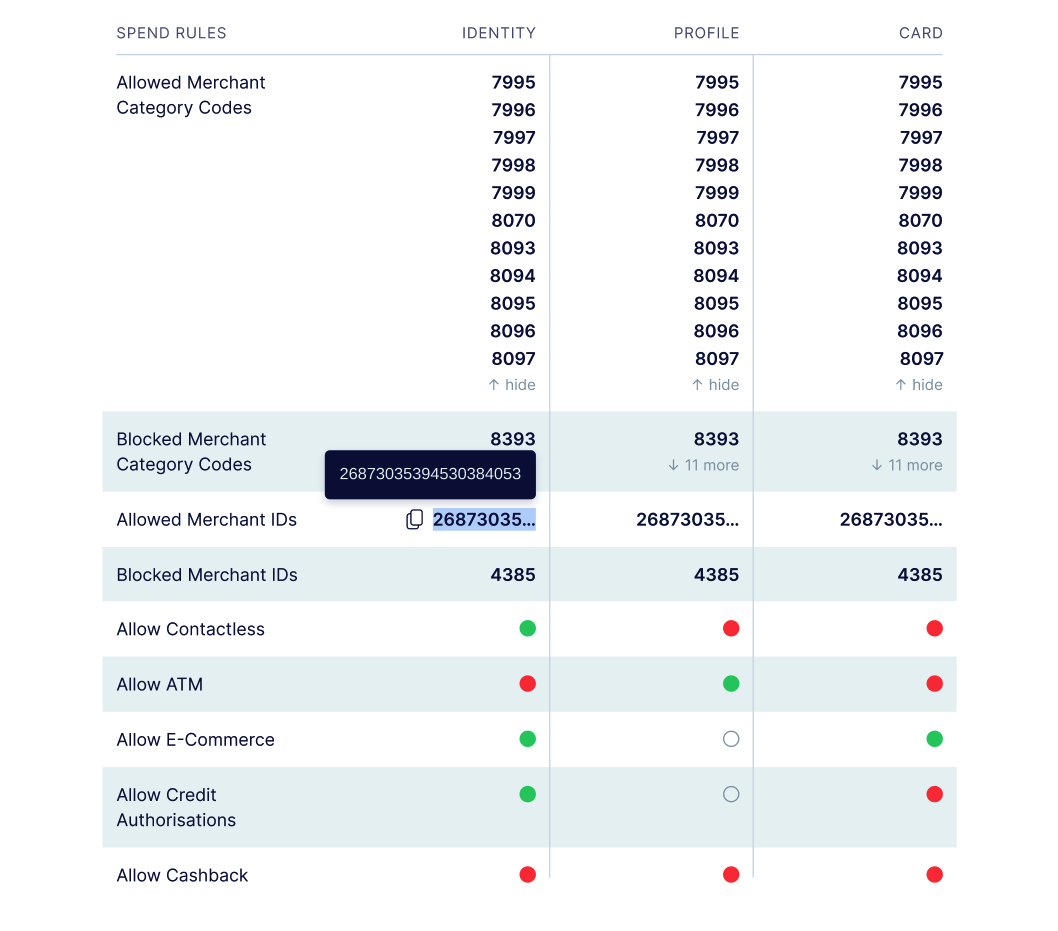
The current spend rules response combines all rules that apply. This response object will be deprecated and the Get Spend Rules API endpoint enhanced to contain three response objects (groupings):
- Card level spend rules: These are spend rules that are associated with the specific card itself
- Profile level spend rules: These are the spend rules that are configured in the MultiMulti Weavr Multi is an embedded finance solution that allows you to integrate financial services into your own application, providing a seamless experience for your customers. It enables you to offer managed accounts, managed cards, and transactions without requiring financial expertise. portal > Settings > Managed CardsManaged Card A payment card (virtual or physical) that can be created and managed through the Weavr platform. Cards can operate in prepaid mode (with their own balance) or debit mode (linked to a managed account). All cards must be assigned to a card assignee who is an Authorised User. screen.
- Identity level spend rules: These are spend rules that are associated with the cardholder (owner of the card).
Note that the response objects will only contain rules that have been configured within its group, thereby omitting all un-configured rules.
Innovator portal Spend Rules configuration screen
An enhanced UI card details screen will be provided, allowing viability of all spend rules associated with a card; allocated by each of the three object groups.
Affected MultiMulti Weavr Multi is an embedded finance solution that allows you to integrate financial services into your own application, providing a seamless experience for your customers. It enables you to offer managed accounts, managed cards, and transactions without requiring financial expertise. APIs:
/managed_cards/\{id\}/spend_rules
Affected Back office APIs:
/managed_cards/\{id\}/spend_rules
Deposit Transaction Fee Incorporation
As you are aware, it is possible to configure a fee for each deposit registered on a managed accountManaged Account An account held at a financial institution that can be created and managed through the Weavr platform. Each account has a balance where customers can hold funds. Optionally, an IBAN can be assigned to enable wire transfers to bank accounts outside of Weavr. - Managed AccountManaged Account An account held at a financial institution that can be created and managed through the Weavr platform. Each account has a balance where customers can hold funds. Optionally, an IBAN can be assigned to enable wire transfers to bank accounts outside of Weavr. Fees.
In order to maintain compliance with regulations, the way a deposit transaction value is reflected in the “GET a managed accountManaged Account An account held at a financial institution that can be created and managed through the Weavr platform. Each account has a balance where customers can hold funds. Optionally, an IBAN can be assigned to enable wire transfers to bank accounts outside of Weavr. statement” API response and “Account Deposit” webhook message, will be refined.
The transaction amount of the deposit will be inclusive of any applicable fee amount, representing the initial amount deposited (before fee collection).
The fee value itself will continue to be shared in the transactionFee field, and this content is not changing.
Example
Current:
- A £100.00 deposit with a deposit fee of £2.00 shows as transactionAmount.amount = 9800 and transactionFee.amount = 200
After the change:
- A £100.00 deposit with a deposit fee of £2.00 will show as transactionAmount.amount = 10000 and transactionFee.amount = 200
Affected API:
GET /managed_accounts/\{id\}/statement
Affected webhook:
POST /managed_accounts/deposits/watch
Account & Card Activity Statement Refinement
Currently two entries are returned on the activity statement screens for transactions such as deposits, original credit transactions, and the credit portion of a sendSend A transaction type that allows sending funds to another identity's instrument or to a beneficiary. Send transactions may require Strong Customer Authentication depending on the destination and whether it's a trusted beneficiary.. Display adjustments will differentiate these events and what they represent:
One record will represent the credit entry once the transaction is complete, with an amount in bold.
One record will represent the status of the transaction, with status either “Pending” or “Completed”, and an amount that is greyed-out.
Example deposit transaction:

Managed AccountManaged Account An account held at a financial institution that can be created and managed through the Weavr platform. Each account has a balance where customers can hold funds. Optionally, an IBAN can be assigned to enable wire transfers to bank accounts outside of Weavr. - PDF Statements
A new option will be available when retrieving a Managed AccountManaged Account An account held at a financial institution that can be created and managed through the Weavr platform. Each account has a balance where customers can hold funds. Optionally, an IBAN can be assigned to enable wire transfers to bank accounts outside of Weavr. Statement. The additional format of pdf will be supported for statement download.
The statement includes settled transactions only, for the range that you request. Pending transactions and authorisations will not be included on the pdf statement, but will continue to be returned in the json and csv formats, as well as continue to be displayed on the innovator portal as normal.
This improvement provides functionality to meet a regulatory requirement of providing the Managed AccountManaged Account An account held at a financial institution that can be created and managed through the Weavr platform. Each account has a balance where customers can hold funds. Optionally, an IBAN can be assigned to enable wire transfers to bank accounts outside of Weavr. owner with a statement in a 'durable medium', and should be added to your client offering.
To receive the statement as a pdf, sendSend A transaction type that allows sending funds to another identity's instrument or to a beneficiary. Send transactions may require Strong Customer Authentication depending on the destination and whether it's a trusted beneficiary. application/pdf in the accept Header Parameter.
API affected:
GET /managed_accounts/\{id\}/statement
Outgoing Wire TransferWire Transfer A transaction that moves funds between accounts. An incoming wire transfer moves funds from a third-party bank account to a Weavr managed account, while an outgoing wire transfer moves funds from a Weavr managed account to a third-party bank account. Wire transfers require the managed account to have an assigned IBAN (for EUR) or sort code and account number (for GBP). (OWTOWT Outgoing Wire Transfer - a transaction that moves funds from a Weavr managed account to a bank account held at a third-party financial institution. OWTs require the managed account to have an assigned IBAN and the user to complete Strong Customer Authentication.) “Description” Validation
The description field within the "Create an OWTOWT Outgoing Wire Transfer - a transaction that moves funds from a Weavr managed account to a bank account held at a third-party financial institution. OWTs require the managed account to have an assigned IBAN and the user to complete Strong Customer Authentication." API can be used for a payment reference or message to accompany a payment. This field is optional, but when completed, is passed to the ultimate beneficiaryBeneficiary A trusted recipient for payments that includes both information about the business or individual as well as their bank account or instrument details. When using trusted beneficiaries, customers may be allowed to skip Strong Customer Authentication (SCA) when executing Outgoing Wire Transfer or Send transactions, reducing the number of approval steps required..
The validation on this field has been updated to match bank-transferTransfer A transaction that moves funds between instruments managed by Weavr. The source and destination instruments of a transfer transaction must be owned by the same identity. Transfers can be scheduled for future execution and can be performed in bulk operations. standards, maintaining compliance with receiving-banks, and ensuring an entered description can be processed. The length of the message depends on the type of OWTOWT Outgoing Wire Transfer - a transaction that moves funds from a Weavr managed account to a bank account held at a third-party financial institution. OWTs require the managed account to have an assigned IBAN and the user to complete Strong Customer Authentication. being created:
- SEPA and SWIFT = <=35 characters
- Faster Payments = <=18 characters
API affected:
- POST /outgoing_wire_transfersTransfer A transaction that moves funds between instruments managed by Weavr. The source and destination instruments of a transfer transaction must be owned by the same identity. Transfers can be scheduled for future execution and can be performed in bulk operations.
Manual Transactions - New Webhook
A new webhook endpoint has been added, such that, In the event of a manual transaction adjustment occurring on an instrument, a webhook notification message will be automatically triggered that contains essential information on the action taken, ensuring systems remain in synch with Weavr.
The webhook message provides the ID, timestamp of the transaction, target instrument, as well as the relevant adjustment details, such as balance value.
Affected webhook:
- POST /manual_transactions/watch
Confirm Password UI Component
To strengthen the validation on password input during user onboarding, a new UI component called “confirm password” will be introduced. This confirm password component validates again the existing “password” component to ensure an exact match.
Read our Confirm Password UI Component guide on how to make use of this new capability in your product.
Removal of mobile uniqueness
It is no longer necessary for Authorised Users to have a unique mobile number. The email of the Authorised User must be unique but a mobile number can be used again for a different user.