Multi API v3.35
Reject duplicate identities for consumersConsumers Individual persons who can be onboarded as identities on Weavr. Consumer identities represent individual customers and require Know Your Customer (KYC) verification. For consumers, the card owner and card assignee are typically the same person. programmes
We are launching a new feature that will block same user creating multiple identities on your programme. This is going to help you:
- Prevent fraud
- Increase security
- Improve customer support
- Enhance compliance
- Reduce costs
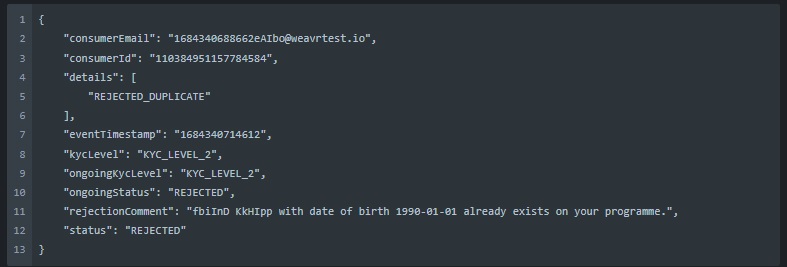
When detecting a duplicate identity, we will communicate via webhook the following:
-
identity_id
-
reason of rejection
-
state of the account
-
timestamp
Here’s an example of a response for a Duplicate identity:
Reversal of returned Outgoing Wire TransfersWire Transfer A transaction that moves funds between accounts. An incoming wire transfer moves funds from a third-party bank account to a Weavr managed account, while an outgoing wire transfer moves funds from a Weavr managed account to a third-party bank account. Wire transfers require the managed account to have an assigned IBAN (for EUR) or sort code and account number (for GBP).
We are improving the processing of transactions if an Outgoing Wire TransferWire Transfer A transaction that moves funds between accounts. An incoming wire transfer moves funds from a third-party bank account to a Weavr managed account, while an outgoing wire transfer moves funds from a Weavr managed account to a third-party bank account. Wire transfers require the managed account to have an assigned IBAN (for EUR) or sort code and account number (for GBP). is returned by the beneficiaryBeneficiary A trusted recipient for payments that includes both information about the business or individual as well as their bank account or instrument details. When using trusted beneficiaries, customers may be allowed to skip Strong Customer Authentication (SCA) when executing Outgoing Wire Transfer or Send transactions, reducing the number of approval steps required. bank or other payment service provider, and making the status of the original Outgoing Wire TransferWire Transfer A transaction that moves funds between accounts. An incoming wire transfer moves funds from a third-party bank account to a Weavr managed account, while an outgoing wire transfer moves funds from a Weavr managed account to a third-party bank account. Wire transfers require the managed account to have an assigned IBAN (for EUR) or sort code and account number (for GBP). clearer.
If an Outgoing Wire TransferWire Transfer A transaction that moves funds between accounts. An incoming wire transfer moves funds from a third-party bank account to a Weavr managed account, while an outgoing wire transfer moves funds from a Weavr managed account to a third-party bank account. Wire transfers require the managed account to have an assigned IBAN (for EUR) or sort code and account number (for GBP). was sent successfully, but ultimately refused and returned by the beneficiaryBeneficiary A trusted recipient for payments that includes both information about the business or individual as well as their bank account or instrument details. When using trusted beneficiaries, customers may be allowed to skip Strong Customer Authentication (SCA) when executing Outgoing Wire Transfer or Send transactions, reducing the number of approval steps required. bank, the funds will be credited back to the managed accountManaged Account An account held at a financial institution that can be created and managed through the Weavr platform. Each account has a balance where customers can hold funds. Optionally, an IBAN can be assigned to enable wire transfers to bank accounts outside of Weavr., as well as any fees (this option can be selected via a new portal option). The original Outgoing Wire TransferWire Transfer A transaction that moves funds between accounts. An incoming wire transfer moves funds from a third-party bank account to a Weavr managed account, while an outgoing wire transfer moves funds from a Weavr managed account to a third-party bank account. Wire transfers require the managed account to have an assigned IBAN (for EUR) or sort code and account number (for GBP). will also be updated with a new state RETURNED (currently the Outgoing Wire TransfersWire Transfer A transaction that moves funds between accounts. An incoming wire transfer moves funds from a third-party bank account to a Weavr managed account, while an outgoing wire transfer moves funds from a Weavr managed account to a third-party bank account. Wire transfers require the managed account to have an assigned IBAN (for EUR) or sort code and account number (for GBP). remain in the state COMPLETED). When calling a statement there will be a new transactionState entry with a RETURNED state, indicating the OWTsOWT Outgoing Wire Transfer - a transaction that moves funds from a Weavr managed account to a bank account held at a third-party financial institution. OWTs require the managed account to have an assigned IBAN and the user to complete Strong Customer Authentication. that were returned.
A new state RETURNED will be added to the “Outgoing Wire TransferWire Transfer A transaction that moves funds between accounts. An incoming wire transfer moves funds from a third-party bank account to a Weavr managed account, while an outgoing wire transfer moves funds from a Weavr managed account to a third-party bank account. Wire transfers require the managed account to have an assigned IBAN (for EUR) or sort code and account number (for GBP). transaction” webhook, and will be sent if an Outgoing Wire TransferWire Transfer A transaction that moves funds between accounts. An incoming wire transfer moves funds from a third-party bank account to a Weavr managed account, while an outgoing wire transfer moves funds from a Weavr managed account to a third-party bank account. Wire transfers require the managed account to have an assigned IBAN (for EUR) or sort code and account number (for GBP). is updated to this state.
The Outgoing Wire TransfersWire Transfer A transaction that moves funds between accounts. An incoming wire transfer moves funds from a third-party bank account to a Weavr managed account, while an outgoing wire transfer moves funds from a Weavr managed account to a third-party bank account. Wire transfers require the managed account to have an assigned IBAN (for EUR) or sort code and account number (for GBP). will also have the state RETURNED in the following APIs
GET: outgoing_wire_transfers/\id\}
GET: managed_accounts/{id\}/statement
In the portal, in the Managed AccountManaged Account An account held at a financial institution that can be created and managed through the Weavr platform. Each account has a balance where customers can hold funds. Optionally, an IBAN can be assigned to enable wire transfers to bank accounts outside of Weavr. activity statement, the original Outgoing Wire TransferWire Transfer A transaction that moves funds between accounts. An incoming wire transfer moves funds from a third-party bank account to a Weavr managed account, while an outgoing wire transfer moves funds from a Weavr managed account to a third-party bank account. Wire transfers require the managed account to have an assigned IBAN (for EUR) or sort code and account number (for GBP). will have a tag displayed “RETURNED”.
Previously, an OWTOWT Outgoing Wire Transfer - a transaction that moves funds from a Weavr managed account to a bank account held at a third-party financial institution. OWTs require the managed account to have an assigned IBAN and the user to complete Strong Customer Authentication. would never transition beyond a COMPLETED state. However, it will now be possible for an OWTOWT Outgoing Wire Transfer - a transaction that moves funds from a Weavr managed account to a bank account held at a third-party financial institution. OWTs require the managed account to have an assigned IBAN and the user to complete Strong Customer Authentication. to transition from COMPLETED to RETURNED.
Restrictions on onboarding Non Profit Organisations
This change will impact you if you plan to onboard charities or non-profit organisations, because financial services for these types of organisation are no longer supported.
The full list of supported company types is listed in the API documentation, and the restriction of non-profit organisations will be enforced when creating a corporate using POST multi/corporates.
CorporatesCorporates Business entities that can be onboarded as identities on Weavr. Corporate identities represent companies and require Know Your Business (KYB) verification. They can have multiple authorised users and issue cards to card assignees. of type NON_PROFIT_ORGANISATION will not be accepted and if you attempt to onboard a company having company.type = NON_PROFIT_ORGANISATION, a 409 COMPANY_TYPE_UNSUPPORTED conflict response will be returned.
Country of residence required upon consumer identity creation
The end consumer’s country of residence is key information that is required at the very first step of onboarding (consumer creation) so that the consumer can be directed to the correct onboarding flow depending on the jurisdiction in which they reside.
Currently, when creating a consumer identity using POST /multi/consumers, the country of residence of the consumer (rootUser.address.country) is optional. In such cases, the country would be provided later, during the due diligence process.
We are now making the country of residence mandatory immediately upon creation, in POST /multi/consumers. This will be used to help determine the appropriate due diligence process that the user needs to go through.
If a country is not provided in the call, the API will respond with 400 Bad Request Error.
Removing “Set spend rules for a managed cardManaged Card A payment card (virtual or physical) that can be created and managed through the Weavr platform. Cards can operate in prepaid mode (with their own balance) or debit mode (linked to a managed account). All cards must be assigned to a card assignee who is an Authorised User.” deprecated API
The deprecated “Set spend rules” PUT API will be removed in favour of the 3 existing API endpoints:
Create spend rules config API endpoint: This new POST API endpoint should be used when setting up the spend rules for the first time on a card.
Update spend rules config API endpoint: This new PATCH API endpoint should be used when spend rules have already been set on a card and these need amending to add or alter the rules that are currently configured.
Delete spend rules config API endpoint: This new DELETE API endpoint should be used when spend rules need to be removed that are currently configured on a card.
Unlike the PUT spend rules API endpoint, when using the create, update and delete spend rules API endpoints, only the rules that you want to configure need to provided. The rules that do not apply can be left out.
Affected APIs:
PUT /managed_cards/\{id\}/spend_rules
POST /managed_cards/\{id\}/spend_rules
PATCH /managed_cards/\{id\}/spend_rules
DELETE /managed_cards/\{id\}/spend_rules
Retrieving Spend Rules
The current spend rules response combines all rules that apply. This response object will be deprecated and the Get Spend Rules API endpoint enhanced to contain three response objects (groupings):
Card level spend rules: These are spend rules that are associated with the specific card itself
Identity level spend rules: These are spend rules that are associated with the cardholder (owner of the card).
Profile level spend rules: These are the spend rules that are configured in the MultiMulti Weavr Multi is an embedded finance solution that allows you to integrate financial services into your own application, providing a seamless experience for your customers. It enables you to offer managed accounts, managed cards, and transactions without requiring financial expertise. portal > Settings > Managed CardsManaged Card A payment card (virtual or physical) that can be created and managed through the Weavr platform. Cards can operate in prepaid mode (with their own balance) or debit mode (linked to a managed account). All cards must be assigned to a card assignee who is an Authorised User. screen
Note that the response objects will only contain rules that have been configured within its group, thereby omitting all un-configured rules.
Affected APIs:
GET /managed_cards/\{id\}/spend_rules