Multi API v3.44
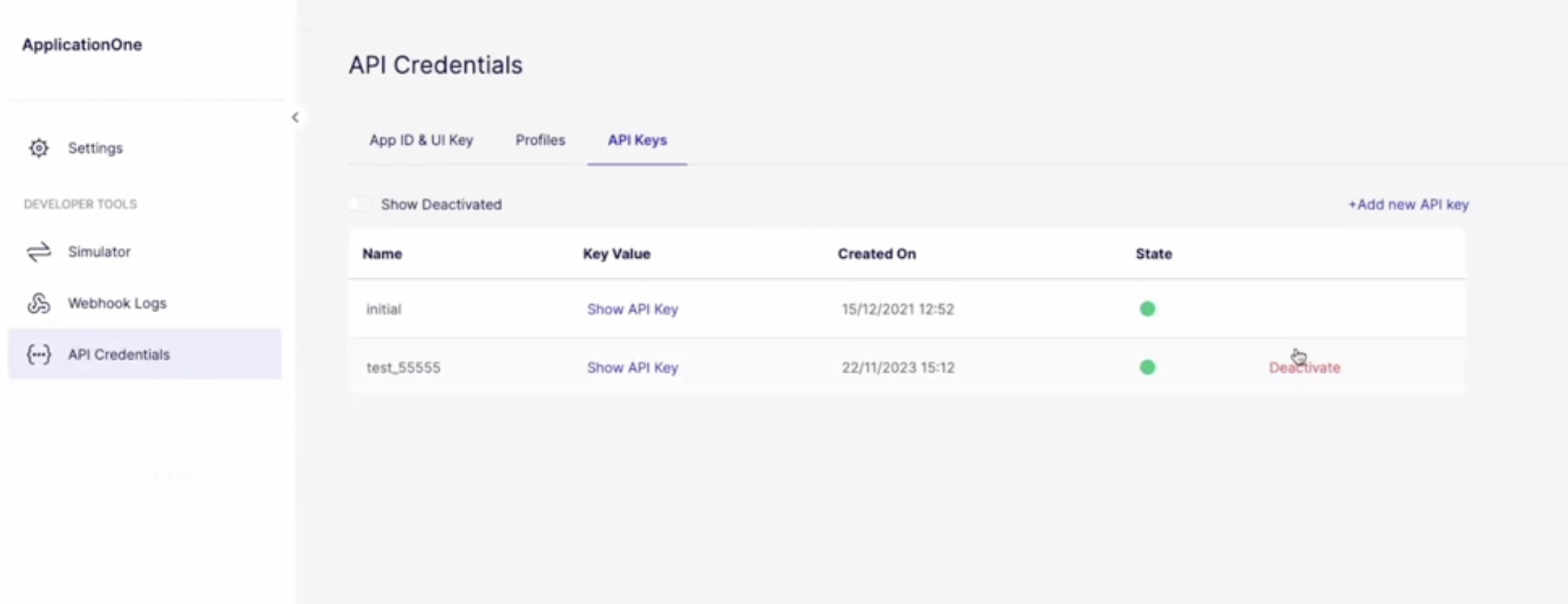
Enhanced API Key management
EmbeddersEmbedder A company or developer that integrates Weavr's embedded finance services into their own application to provide financial services to their end customers. now have the flexibility of managing and rotating API keys, ensuring secure usage and storage. These options are conveniently accessible on the API Credentials page, within the Embedder portalEmbedder Portal A web-based portal where embedders can access their Weavr account, manage API credentials, configure settings, view dashboards, and access documentation. The portal provides access to both sandbox and production environments, with separate credentials for each..
This enhancement introduces three new options for managing API Keys:
- Creating additional API Keys: Create multiple API keys to support various use cases and enhance security measures. To create a new key, EmbeddersEmbedder A company or developer that integrates Weavr's embedded finance services into their own application to provide financial services to their end customers. should navigate to the API Keys tab and click "Add New API Key".
- Rotating between keys: Easily switch between different API keys, ensuring secure usage. EmbeddersEmbedder A company or developer that integrates Weavr's embedded finance services into their own application to provide financial services to their end customers. can click to reveal and copy the key provided within the API Keys tab.
- Deactivating an API key: In the event of security concerns or changes in access requirements, EmbeddersEmbedder A company or developer that integrates Weavr's embedded finance services into their own application to provide financial services to their end customers. can deactivate API keys as needed. Once deactivated, an API key cannot be reactivated.
Alternative Step-up via fallback SMS channel
EmbeddersEmbedder A company or developer that integrates Weavr's embedded finance services into their own application to provide financial services to their end customers. may use different channels for stepping-up a token: SMS, Twilio Authy or Biometrics. In situations where users encounter difficulties accessing Twilio Authy for authentication, EmbeddersEmbedder A company or developer that integrates Weavr's embedded finance services into their own application to provide financial services to their end customers. can now initiate the SMS channel as a fallback. This ensures that users still receive the verification code and can successfully confirm the challenge.
Enhanced User Verification Indicators
To prevent confusion in interpreting user verification statuses, the verification indicators now feature new, distinct, and recognisable colours corresponding to their respective statuses:
- Upon creating a new user, the email and mobile verification indicators will now appear grey instead of red.
- When a new user starts verifying the email or mobile, the verification indicators will be displayed yellow, not red.
- Upon successful verification of the email or mobile, the verification status will continue to be indicated in green.
Enhanced Data Insights Dashboard
To ensure EmbeddersEmbedder A company or developer that integrates Weavr's embedded finance services into their own application to provide financial services to their end customers. can closely monitor the progress and operations of their customers, the Data Insights Dashboard has been enriched with the following information:
- The details table within the KYCKYC Know Your Customer - the identity verification process for consumer identities. This process allows you to seamlessly and securely verify your user's identity. Weavr will ask users to submit the necessary information and documentation so that they can get approved by financial providers. Overview dashboard includes a new Rejection Comment column, showing the reason why a consumer failed a KYCKYC Know Your Customer - the identity verification process for consumer identities. This process allows you to seamlessly and securely verify your user's identity. Weavr will ask users to submit the necessary information and documentation so that they can get approved by financial providers. submission.
- The Card Settlements and Fees Details dashboards now include new filtering options:
- a. Managed CardManaged Card A payment card (virtual or physical) that can be created and managed through the Weavr platform. Cards can operate in prepaid mode (with their own balance) or debit mode (linked to a managed account). All cards must be assigned to a card assignee who is an Authorised User. ID, Merchant Name and Merchant Category Code filters, within the Card Settlements dashboard
- b. Instrument Friendly Name, Card Last 4 Digits, Merchant Category and Merchant Category Code (where applicable), within the Fees Details dashboard.