Events
You can subscribe to receive events via the Portal. Once subscribed you receive notifications about events that apply to your customers, such as completions of KYB processes and payment run status updates.
To use event notifications, you need to implement an endpoint that listens to events from Weavr. Weavr always sends events using a POST request with the event details included in the request body.
You can find the full list of published events here.
Configure your application webhook URL
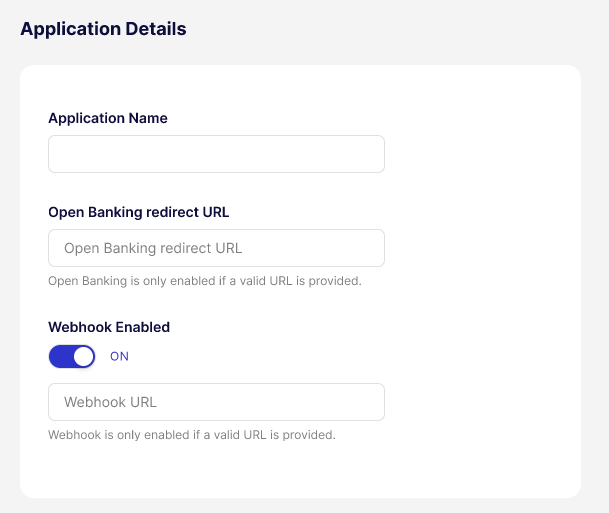
To start receiving events, you need to switch on events and configure the endpoint to which Weavr sends the event details. You can do this in the Portal by navigating to the Settings > Application Details section.
Verify the authenticity of a webhook
When we send a webhook to your configured endpoint, each request includes cryptographic signatures that allow you to verify the request originated from Weavr (has not been tampered with).
HTTP headers
Every webhook request includes the following headers:
| Header | Type | Description |
|---|---|---|
call-ref | String | Unique identifier for this webhook delivery. Use for correlation and idempotency. |
Published-Timestamp | String | Unix epoch timestamp in milliseconds when the webhook was published. |
Signature (deprecated) | String | Base64-encoded HMAC-SHA256 signature (legacy). |
Signature-v2 | String | Base64-encoded HMAC-SHA256 signature (recommended). |
Signature Algorithms
Signature V2 (Recommended)
Use Signature-v2 for all new integrations.
The Signature-v2 header contains a Base64-encoded HMAC-SHA256 hash computed over the concatenation of:
call-ref + request_body + published-timestamp
- No separators between the three components
request_bodyis the raw JSON payload exactly as received (do not parse and re-serialize)- Your API key is used as the secret key
API key selection for multiple API clients
If your programme has multiple API clients, the platform selects the API key from the client with the oldest creation timestamp.
The webhook headers do not include a key identifier. During key rotation with multiple API clients, verify against your oldest API client first.
Verifying Signature-v2 headers
- Extract
call-ref,Published-Timestamp, andSignature-v2from request headers - Capture the raw request body before any parsing
- Concatenate:
{call-ref}{raw_body}{Published-Timestamp} - Compute HMAC-SHA256 using your API key as the secret
- Base64-encode the result
- Compare with
Signature-v2using constant-time comparison
Code Examples
- Shell
- Java
- Python
- Node.js
- C#
echo -n "${CALL_REF}${PAYLOAD}${PUBLISHED_TIMESTAMP}" | \
  openssl dgst -sha256 -hmac "${API_KEY}" -binary | base64
import javax.crypto.Mac;
import javax.crypto.spec.SecretKeySpec;
import java.nio.charset.StandardCharsets;
import java.security.MessageDigest;
import java.util.Base64;

public boolean verifyWebhookSignature(
        String callRef,
        String rawBody,
        String publishedTimestamp,
        String signatureV2,
        String apiKey) {
    try {
        String message = callRef + rawBody + publishedTimestamp;
        Mac mac = Mac.getInstance("HmacSHA256");
        mac.init(new SecretKeySpec(
            apiKey.getBytes(StandardCharsets.UTF_8), "HmacSHA256"));
        byte[] hash = mac.doFinal(message.getBytes(StandardCharsets.UTF_8));
        String computed = Base64.getEncoder().encodeToString(hash);

        return MessageDigest.isEqual(
            computed.getBytes(StandardCharsets.UTF_8),
            signatureV2.getBytes(StandardCharsets.UTF_8));
    } catch (Exception e) {
        return false;
    }
}
import hmac
import hashlib
import base64

def verify_webhook_signature(
    call_ref: str,
    raw_body: str,
    published_timestamp: str,
    signature_v2: str,
    api_key: str
) -> bool:
    message = f"{call_ref}{raw_body}{published_timestamp}"
    computed = base64.b64encode(
        hmac.new(
            api_key.encode("utf-8"),
            message.encode("utf-8"),
            hashlib.sha256
        ).digest()
    ).decode("utf-8")

    return hmac.compare_digest(computed, signature_v2)
const crypto = require("crypto");

function verifyWebhookSignature(
  callRef,
  rawBody,
  publishedTimestamp,
  signatureV2,
  apiKey
) {
  const message = `${callRef}${rawBody}${publishedTimestamp}`;
  const computed = crypto
    .createHmac("sha256", apiKey)
    .update(message, "utf8")
    .digest("base64");

  return crypto.timingSafeEqual(
    Buffer.from(computed, "utf8"),
    Buffer.from(signatureV2, "utf8")
  );
}
using System;
using System.Security.Cryptography;
using System.Text;

public static bool VerifyWebhookSignature(
    string callRef,
    string rawBody,
    string publishedTimestamp,
    string signatureV2,
    string apiKey)
{
    var message = $"{callRef}{rawBody}{publishedTimestamp}";
    using var hmac = new HMACSHA256(Encoding.UTF8.GetBytes(apiKey));
    var hash = hmac.ComputeHash(Encoding.UTF8.GetBytes(message));
    var computed = Convert.ToBase64String(hash);

    return CryptographicOperations.FixedTimeEquals(
        Encoding.UTF8.GetBytes(computed),
        Encoding.UTF8.GetBytes(signatureV2));
}
Rotating API keys
If you periodically rotate your API keys, you'll also need to update the Signature-v2 you expect. To do this:
- Create the new API client
- Additionally accept the new
Signature-v2(Webhooks continue using your oldest API client) - Delete the old API client when ready to switch
- Webhooks immediately begin using the new oldest API client
- Stop accepting the old
Signature-v2
During transition, in-flight webhooks may be signed with either key.
Security recommendations
- Verify signatures before processing payloads
- Use constant-time comparison to prevent timing attacks
- Reject webhooks with timestamps older than 5 minutes to prevent replay attacks
- Store API keys securely; never expose in client-side code or logs
Webhook log
The webhook log displays the following information:
Event IDis a unique identifier linked to each webhook event, allowing for tracking and searching of specific events within the Webhook Logs page by searching by the event ID.Createddate is the timestamp when the webhook was initially created.Last Sentdate is the timestamp when the webhook was last triggered or replayed.Event Typeis a categorisation of the type of event that triggered the webhook, such as a login, step-up, a type of transaction or an instrument operation.Operationdescribes the action associated with the webhook event.- The
HTTP Codereturned by the webhook event in response to the payload delivery attempt, indicating the success or failure of the operation (example 200 for success, 404 for not found, 500 for internal server error). Attemptsis the number of times the webhook event was replayed.Statusof the webhook if it was successful or not.
We restructured the list of webhook events to be presented in descending order, with the latest created event displayed first.
Webhook retries
Weavr sends webhook notifications as POST HTTP requests on the webhook URL that is specified in the Portal > Application Details.
Whenever an HTTP response error (408,409,425,5xx) is received in response to a webhook request, Weavr attempts to resend the webhook according to our webhook retry policy. If retries also result in a failure, the webhook is marked as Failed and no further attempts to send the webhook are made.
Webhook Retry policy
Weavr re-attempts to send webhooks to the destination URL with an exponential backoff for 5 times starting with an initial delay of 10 seconds. The delay increments with a factor of 6 after every failed attempt:
- Failure on first attempt: retry after 10s
- Failure on second attempt: retry after 60s (10s *6) i.e. 1 minute
- Failure on third attempt: retry after 360s (60s *6) i.e. 5 minutes
- Failure on fourth attempt: retry after 2160s (360s *6) i.e. 36 minutes
- Failure on fifth attempt: retry after 12960s (2160s *6) i.e. 3 hours 36 minutes
- Should the 5th attempt fail, the webhook is marked as failed and no further attempts are made.
Webhook logs can be accessed via the Portal. You can also retry the particular webhook yourself via the Portal.