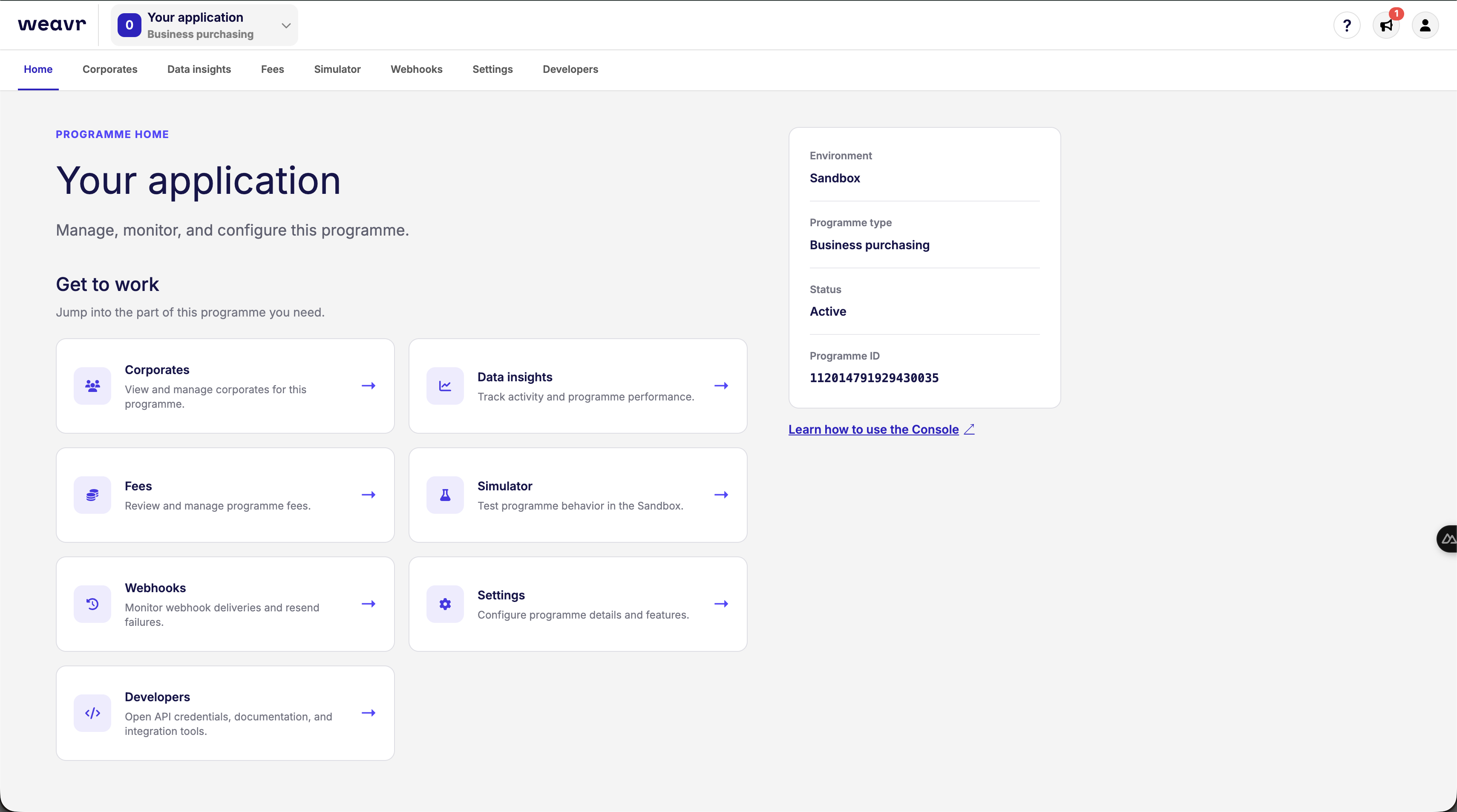
Updated Embedder Portal navigation
The Embedder PortalEmbedder PortalA web-based portal where embedders manage their Weavr account: browse customers and instruments, configure programmes, find API credentials and profile IDs, run Sandbox simulations, and inspect webhook deliveries. Sandbox and Live are separate, with their own credentials and data. navigation has changed. Use the tabs across the top to open your programmeProgrammeA programme represents your application within Weavr. Everything you create - customers, instruments, and transactions - sits beneath a programme. When you register as an Embedder, you receive a programme in the Sandbox and, once approved, one in Live. A programme is not a Workspace: a workspace is your company's account, and it can hold several programmes.'s pages, and the account menu in the top-right for your profileProfileA template defining the configuration for one type of object - corporate identity, consumer identity, managed account, managed card, transfer, or outgoing wire transfer. When you create one of these objects you reference its Profile ID, which tells Weavr which limits, currencies, supported countries, branding, and fees to apply. Your programme ships with one or more Profile IDs per supported object type. and team.
Where to find your pages
| Looking for | Where to find it |
|---|---|
| Another programmeProgrammeA programme represents your application within Weavr. Everything you create - customers, instruments, and transactions - sits beneath a programme. When you register as an Embedder, you receive a programme in the Sandbox and, once approved, one in Live. A programme is not a Workspace: a workspace is your company's account, and it can hold several programmes. | Open the programmeProgrammeA programme represents your application within Weavr. Everything you create - customers, instruments, and transactions - sits beneath a programme. When you register as an Embedder, you receive a programme in the Sandbox and, once approved, one in Live. A programme is not a Workspace: a workspace is your company's account, and it can hold several programmes. selector next to the Weavr logo. |
| Customers previously under Console | Open CorporatesCorporates (Corporate Identity). Business entities that can be onboarded as customers on Weavr. Corporate customers represent companies and require Know Your Business (KYB) verification. They can have multiple authorised users and issue cards to card assignees. or ConsumersConsumers (Consumer). Individual people who can be onboarded as customers on Weavr. Consumer customers require Know Your Customer (KYC) verification. For consumers, the card owner and card assignee are typically the same person., depending on your programmeProgrammeA programme represents your application within Weavr. Everything you create - customers, instruments, and transactions - sits beneath a programme. When you register as an Embedder, you receive a programme in the Sandbox and, once approved, one in Live. A programme is not a Workspace: a workspace is your company's account, and it can hold several programmes.. Select a customer to view their users, accounts, and cards. |
| ProgrammeProgrammeA programme represents your application within Weavr. Everything you create - customers, instruments, and transactions - sits beneath a programme. When you register as an Embedder, you receive a programme in the Sandbox and, once approved, one in Live. A programme is not a Workspace: a workspace is your company's account, and it can hold several programmes. configuration | Open Settings. ProfileProfileA template defining the configuration for one type of object - corporate identity, consumer identity, managed account, managed card, transfer, or outgoing wire transfer. When you create one of these objects you reference its Profile ID, which tells Weavr which limits, currencies, supported countries, branding, and fees to apply. Your programme ships with one or more Profile IDs per supported object type. settings are grouped under Customers, InstrumentsInstrumentA financial product owned by a customer. There are two types: Managed Accounts (stored-value accounts that hold balances and can receive wire transfers) and Managed Cards (prepaid cards - virtual or physical - used for purchases)., and Transactions. |
| ProgrammeProgrammeA programme represents your application within Weavr. Everything you create - customers, instruments, and transactions - sits beneath a programme. When you register as an Embedder, you receive a programme in the Sandbox and, once approved, one in Live. A programme is not a Workspace: a workspace is your company's account, and it can hold several programmes. ID, UI keyUI keyA public key that authorizes Weavr's Secure UI components - the inputs and displays in our Web, Android, iOS, and React Native SDKs that handle passwords, PINs, card details, and KYC/KYB flows. Unlike the API key, the UI key isn't an API credential; you don't call REST endpoints with it. It's safe to embed in client-side code, and Sandbox and Live each have their own UI key., or webhook signing keys | Open Developers > API credentials. |
| API clients and API keys | Open Developers > API credentials and scroll to API clients. |
| ProfileProfileA template defining the configuration for one type of object - corporate identity, consumer identity, managed account, managed card, transfer, or outgoing wire transfer. When you create one of these objects you reference its Profile ID, which tells Weavr which limits, currencies, supported countries, branding, and fees to apply. Your programme ships with one or more Profile IDs per supported object type. IDs | Open Developers > ProfileProfileA template defining the configuration for one type of object - corporate identity, consumer identity, managed account, managed card, transfer, or outgoing wire transfer. When you create one of these objects you reference its Profile ID, which tells Weavr which limits, currencies, supported countries, branding, and fees to apply. Your programme ships with one or more Profile IDs per supported object type. IDs. |
| Webhook endpoint configuration | Open Developers > Webhooks. |
| Webhook delivery logs | Open Webhooks > Logs. |
| Sandbox testing | Open Simulator. |
| Reports and programmeProgrammeA programme represents your application within Weavr. Everything you create - customers, instruments, and transactions - sits beneath a programme. When you register as an Embedder, you receive a programme in the Sandbox and, once approved, one in Live. A programme is not a Workspace: a workspace is your company's account, and it can hold several programmes. fees | Open Data insights or Fees. |
| Your profileProfileA template defining the configuration for one type of object - corporate identity, consumer identity, managed account, managed card, transfer, or outgoing wire transfer. When you create one of these objects you reference its Profile ID, which tells Weavr which limits, currencies, supported countries, branding, and fees to apply. Your programme ships with one or more Profile IDs per supported object type., password, or two-factor authentication | Select the person icon in the top-right, then ProfileProfileA template defining the configuration for one type of object - corporate identity, consumer identity, managed account, managed card, transfer, or outgoing wire transfer. When you create one of these objects you reference its Profile ID, which tells Weavr which limits, currencies, supported countries, branding, and fees to apply. Your programme ships with one or more Profile IDs per supported object type. or Security. |
| Team members and their access | Select the person icon in the top-right, then Manage users. |
The Home page also has shortcuts to your programmeProgrammeA programme represents your application within Weavr. Everything you create - customers, instruments, and transactions - sits beneath a programme. When you register as an Embedder, you receive a programme in the Sandbox and, once approved, one in Live. A programme is not a Workspace: a workspace is your company's account, and it can hold several programmes.'s pages. Available pages depend on your programmeProgrammeA programme represents your application within Weavr. Everything you create - customers, instruments, and transactions - sits beneath a programme. When you register as an Embedder, you receive a programme in the Sandbox and, once approved, one in Live. A programme is not a Workspace: a workspace is your company's account, and it can hold several programmes., environment, and permissions.