Consumer configuration
Learn how to configure the behavior of consumer identities you onboard.
To configure consumer identities, use consumer profiles. You can update your consumer profiles on the Weavr Portal > Settings page.
We must review and approve all configuration in the Sandbox environment before you can push it to the Live environment.
Contact our support team to update the configuration of your Live application.
Authentication
Your customers need to authenticate with Weavr to access their managed accounts and managed cards details as well as initiate payments. Read the authentication guide for more information.
You can configure which authentication methods your customers can use to complete their first factor and second factor authentication steps. By default SMS is already activated, but you can specify Biometrics if you support this channel.
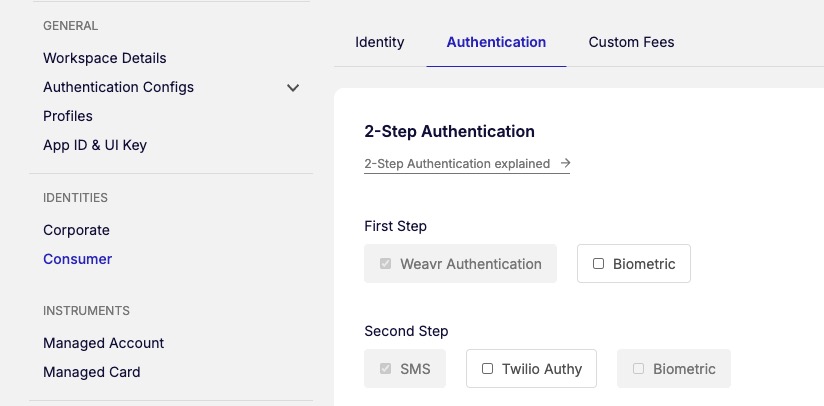
You can also configure which authentication factors are available for your end customers for payment verification (transaction confirmations triggered by you), and 3DS3DS 3-D Secure - an additional security layer for online credit and debit card transactions. It adds an authentication step where the cardholder verifies their identity with the card issuer during the purchase, reducing fraud and providing liability protection for merchants. authentication (triggered externally when a card is used for an ecommerce transaction).
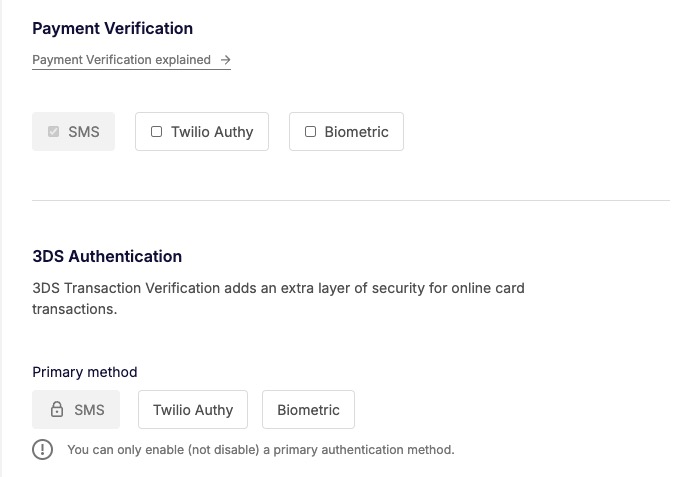
If Biometrics is selected as a primary method for 3DS3DS 3-D Secure - an additional security layer for online credit and debit card transactions. It adds an authentication step where the cardholder verifies their identity with the card issuer during the purchase, reducing fraud and providing liability protection for merchants. authentication, this channel is attempted for the user, before SMS
Email communications
We send emails to your consumer identities to:
- Invite them to set up their credentials
- Provide them with a link to reset their password (if they forgot their password)
- Verify their email address
- Alert when the password has been changed
- Alert when the user enrolls a device for biometrics
Sender email address
You can configure the email address that we use as the sender email when sending emails to your customers. You can do this on the Weavr Portal > Settings > Consumer page.
Customize user comms
You can customize the email and SMS content that we send to your customers so that it aligns with your brand and messaging. This includes support for multiple brands and locales with intelligent fallback logic. See the user communications overview for full details on setting up brand and locale values, designing your template strategy, and understanding the cascading template selection logic.
Application base URL
Email communications may include a URL that leads to your application. For email links to work, you need to configure your application’s base URL. You can configure your application’s base URL on the Weavr Portal > Settings > Consumer page.
If you onboard both consumersConsumers Individual persons who can be onboarded as identities on Weavr. Consumer identities represent individual customers and require Know Your Customer (KYC) verification. For consumers, the card owner and card assignee are typically the same person. and corporatesCorporates Business entities that can be onboarded as identities on Weavr. Corporate identities represent companies and require Know Your Business (KYB) verification. They can have multiple authorised users and issue cards to card assignees. in your application, you can specify a different base URL for each of your identities.