Account Authentication
We authenticate your API requests using your API keys. If you do not include your key when making an API request or you include an invalid API key, we respond with a 401 - Unauthorized HTTP error.
When your Sandbox account is set up, we generate keys for you. You can use these keys in the Sandbox environment only. These are different from the keys for the Live environment, which you receive later.
We provide you with two types of keys:
- You use the API key to authenticate yourself when you make API requests. You should keep this key secret and should only store it securely on your servers. You should never use this key to call the Weavr’s APIs directly from the UI.
- You use the UI keyUI keyA public key that authorizes Weavr's Secure UI components - the inputs and displays in our Web, Android, iOS, and React Native SDKs that handle passwords, PINs, card details, and KYC/KYB flows. Unlike the API key, the UI key isn't an API credential; you don't call REST endpoints with it. It's safe to embed in client-side code, and Sandbox and Live each have their own UI key. to identify your account when you use the Weavr’s UI component library. This key isn’t secret and therefore you can store it in your JavaScript code or in an Android or iPhone app.
Obtaining your keys
Your keys are generated automatically when your account is set up. You can find your keys in the Embedder Portal. Remember that a different set of keys is generated when you upgrade your account to the Live environment.
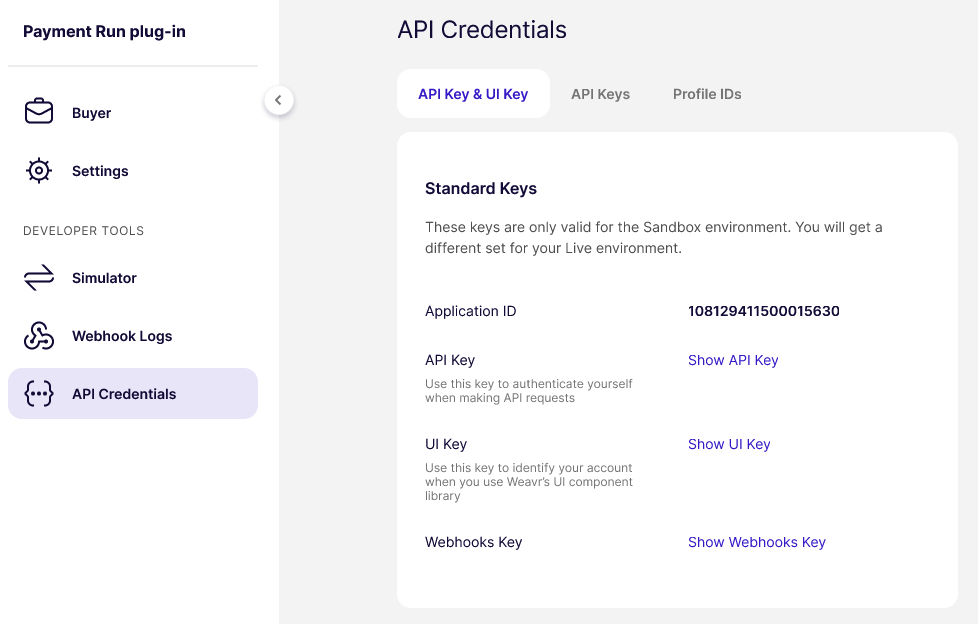
In total, you have 4 keys: an API key and a UI keyUI keyA public key that authorizes Weavr's Secure UI components - the inputs and displays in our Web, Android, iOS, and React Native SDKs that handle passwords, PINs, card details, and KYC/KYB flows. Unlike the API key, the UI key isn't an API credential; you don't call REST endpoints with it. It's safe to embed in client-side code, and Sandbox and Live each have their own UI key. for the Sandbox environment and an API key and a UI keyUI keyA public key that authorizes Weavr's Secure UI components - the inputs and displays in our Web, Android, iOS, and React Native SDKs that handle passwords, PINs, card details, and KYC/KYB flows. Unlike the API key, the UI key isn't an API credential; you don't call REST endpoints with it. It's safe to embed in client-side code, and Sandbox and Live each have their own UI key. for the Live environment.
Using your keys
You should include the API key in the header of every API request. The name of the header is api-key and its value should be your API key.
You should include the UI keyUI keyA public key that authorizes Weavr's Secure UI components - the inputs and displays in our Web, Android, iOS, and React Native SDKs that handle passwords, PINs, card details, and KYC/KYB flows. Unlike the API key, the UI key isn't an API credential; you don't call REST endpoints with it. It's safe to embed in client-side code, and Sandbox and Live each have their own UI key. when initializing the UI library by calling the init method.