Authentication
For a single reference covering every key and ID you need to integrate Weavr, see Keys and IDs.
Weavr Back-office API uses an API key as account authentication:
- Account authentication is used to identify and authenticate you. All API requests require account authentication using your API Key.
We authenticate your API requests using your API keys. If you do not include your key when making an API request or you include an invalid API key, we respond with a 401 - Unauthorized HTTP error.
When you open a Sandbox account, we generate keys for you. You can use these keys in the Sandbox environment only. These are different from the keys for the Live environment, which you receive later.
We provide you with two types of keys API key and UI keyUI keyA public key that authorizes Weavr's Secure UI components - the inputs and displays in our Web, Android, iOS, and React Native SDKs that handle passwords, PINs, card details, and KYC/KYB flows. Unlike the API key, the UI key isn't an API credential; you don't call REST endpoints with it. It's safe to embed in client-side code, and Sandbox and Live each have their own UI key.. For your back-office API you should use the API key:
- You use the API key to authenticate yourself when you make API requests. You should keep this key secret and should only store it securely on your servers. You should never use this key to call Weavr’s APIs directly from the UI.
Obtaining your keys
We generate your keys automatically when you open your account. You can find your keys in the Embedder Portal. Remember that we generate a different set of keys for you when you upgrade your account to the Live environment.
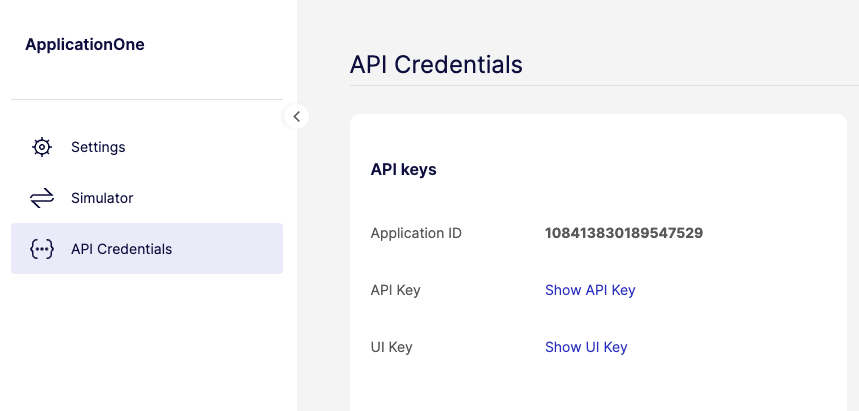
In total, you have 4 keys: an API key and a UI keyUI keyA public key that authorizes Weavr's Secure UI components - the inputs and displays in our Web, Android, iOS, and React Native SDKs that handle passwords, PINs, card details, and KYC/KYB flows. Unlike the API key, the UI key isn't an API credential; you don't call REST endpoints with it. It's safe to embed in client-side code, and Sandbox and Live each have their own UI key. for the Sandbox environment and an API key and a UI keyUI keyA public key that authorizes Weavr's Secure UI components - the inputs and displays in our Web, Android, iOS, and React Native SDKs that handle passwords, PINs, card details, and KYC/KYB flows. Unlike the API key, the UI key isn't an API credential; you don't call REST endpoints with it. It's safe to embed in client-side code, and Sandbox and Live each have their own UI key. for the Live environment. You must use the API key with the Back-office API.
Using your keys
You should include the API key in the header of every API request. The name of the header is api-key and its value should be your API key.
Calling the Back-office APIs
Before running any API call from the Back-office API set, you need to obtain a token representing the given customer. This token can be obtained through the access_token method.
/backoffice/access_token /backoffice/access_token{ "identity": { "type": "CONSUMER", "id": "string" }, "temp": { "type": "CONSUMER", "id": "string" }}