Keys and IDs
When you integrate with Weavr, you'll work with a few keys and several IDs. An API key authenticates your server-side calls and a UI keyUI keyA public key that authorizes Weavr's Secure UI components - the inputs and displays in our Web, Android, iOS, and React Native SDKs that handle passwords, PINs, card details, and KYC/KYB flows. Unlike the API key, the UI key isn't an API credential; you don't call REST endpoints with it. It's safe to embed in client-side code, and Sandbox and Live each have their own UI key. authorizes our Secure UI components in your client app. Newer programmesProgrammeA programme represents your application within Weavr. Everything you create - customers, instruments, and transactions - sits beneath a programme. When you register as an Embedder, you receive a programme in the Sandbox and, once approved, one in Live. A programme is not a Workspace: a workspace is your company's account, and it can hold several programmes. also have a Webhooks key for verifying the webhooks we send you. The IDs identify the configurations we've set up for your programmeProgrammeA programme represents your application within Weavr. Everything you create - customers, instruments, and transactions - sits beneath a programme. When you register as an Embedder, you receive a programme in the Sandbox and, once approved, one in Live. A programme is not a Workspace: a workspace is your company's account, and it can hold several programmes.. This page explains what each one is, where to find it in the Embedder Portal, and where it goes in your code.
Where to find them
Almost everything on this page lives in the Embedder PortalEmbedder PortalA web-based portal where embedders manage their Weavr account: browse customers and instruments, configure programmes, find API credentials and profile IDs, run Sandbox simulations, and inspect webhook deliveries. Sandbox and Live are separate, with their own credentials and data., under Developers > API credentials and Developers > ProfileProfileA template defining the configuration for one type of object - corporate identity, consumer identity, managed account, managed card, transfer, or outgoing wire transfer. When you create one of these objects you reference its Profile ID, which tells Weavr which limits, currencies, supported countries, branding, and fees to apply. Your programme ships with one or more Profile IDs per supported object type. IDs. The exception is your API key, which belongs to an API client - find it under API clients in the account menu. Sandbox and Live each have their own complete set; values don't carry between environments.
The Developers tab also has a Postman collection download. The collection ships with an environment file that pre-populates every ID listed on this page, which is the fastest way to start experimenting.
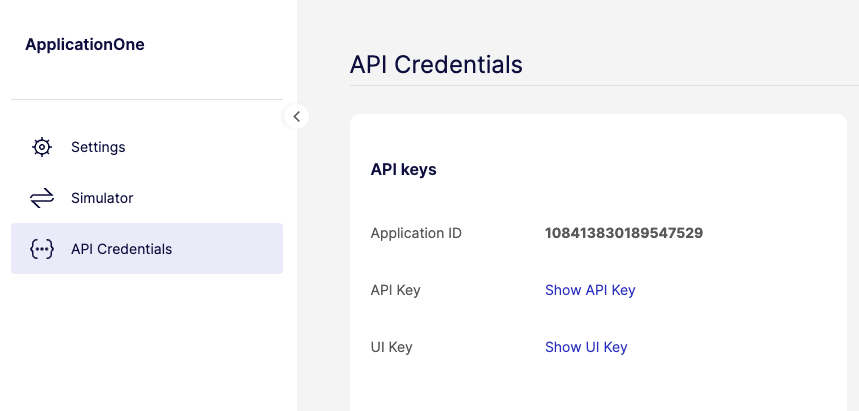
API key
Use your API key to authenticate server-side calls to the Weavr API and the Back-office API.
- Where it goes: the
api-keyHTTP header on every request. - Secrecy: secret. Store on your servers only - never ship it in a mobile app, browser bundle, or public repo.
- Format: base64-encoded string, e.g.
dpcYgcIKBp8BmNhfxHYBIQ==.
api-key: dpcYgcIKBp8BmNhfxHYBIQ==
If a request returns 401 Unauthorized, the key is missing, malformed, or for the wrong environment.
UI key
The UI keyUI keyA public key that authorizes Weavr's Secure UI components - the inputs and displays in our Web, Android, iOS, and React Native SDKs that handle passwords, PINs, card details, and KYC/KYB flows. Unlike the API key, the UI key isn't an API credential; you don't call REST endpoints with it. It's safe to embed in client-side code, and Sandbox and Live each have their own UI key. isn't an API credential - you don't call our REST APIs with it. It authorizes our Secure UI components (the inputs and displays that handle passwords, PINsPIN (Personal Identification Number). Personal Identification Number - the numeric code a cardholder enters to authorize chip-and-PIN purchases and ATM withdrawals. PIN is only present on physical managed cards. Weavr returns it tokenized on `GET /managed_cards/{id}` (with a stepped-up token), and the SDK detokenizes it inside a secure PIN display component., card numbers, and KYCKYC (Know Your Customer). Know Your Customer - the identity verification process for consumer customers. This process allows you to securely verify your user's identity. Weavr asks users to submit the information and documentation they need for approval by financial providers./KYBKYB (Know Your Business). Know Your Business - the identity verification process for corporate customers. This process allows you to securely verify your business customer's identity. Weavr asks users to submit the information and documentation they need for approval by financial providers. flows on your behalf) so sensitive data is tokenizedTokenizeReplace a card's primary account number (PAN) with a unique digital token that stands in for the real card during a transaction. When a cardholder adds a card to Apple Pay or Google Pay via push provisioning, the wallet provider stores a device-specific token rather than the underlying PAN, so the real card number isn't exposed on the device or shared with merchants. client-side and never touches your servers.
- Where it goes: the
init()call for our Web SDK, Android SDK, iOS SDK, and React Native SDK. - Secrecy: public. It's safe to embed in JavaScript, mobile bundles, or any client-side code. The UI keyUI keyA public key that authorizes Weavr's Secure UI components - the inputs and displays in our Web, Android, iOS, and React Native SDKs that handle passwords, PINs, card details, and KYC/KYB flows. Unlike the API key, the UI key isn't an API credential; you don't call REST endpoints with it. It's safe to embed in client-side code, and Sandbox and Live each have their own UI key. alone can't read account data or move money - it only authorizes Secure UI tokenizationTokenizeReplace a card's primary account number (PAN) with a unique digital token that stands in for the real card during a transaction. When a cardholder adds a card to Apple Pay or Google Pay via push provisioning, the wallet provider stores a device-specific token rather than the underlying PAN, so the real card number isn't exposed on the device or shared with merchants..
- Format: alphanumeric string.
window.OpcUxSecureClient.init("YOUR_UI_KEY");
UXComponents.initialize(
    context = this,
    env = ENV.SANDBOX,
    uiKey = "YOUR_UI_KEY",
)
Webhooks key
ProgrammesProgrammeA programme represents your application within Weavr. Everything you create - customers, instruments, and transactions - sits beneath a programme. When you register as an Embedder, you receive a programme in the Sandbox and, once approved, one in Live. A programme is not a Workspace: a workspace is your company's account, and it can hold several programmes. created on or after March 10, 2026 have a dedicated Webhooks key: the secret we use to sign the webhooks we send you. Use it to verify that a webhook came from Weavr and wasn't tampered with. It's separate from your API key and from any API clients, so adding, rotating, or deleting API clients doesn't change it.
- Where to find it: Embedder PortalEmbedder PortalA web-based portal where embedders manage their Weavr account: browse customers and instruments, configure programmes, find API credentials and profile IDs, run Sandbox simulations, and inspect webhook deliveries. Sandbox and Live are separate, with their own credentials and data. → Developers → API credentials, labelled Webhooks key. Select Show Webhooks key to reveal it.
- Where it goes: the HMAC secret in your signature verification - server-side only.
- Secrecy: secret. Store it on your servers only.
A separate Authforwarding Webhooks key on the same screen signs authorization forwarding events.
If your API credentials screen doesn't show a Webhooks key, your programmeProgrammeA programme represents your application within Weavr. Everything you create - customers, instruments, and transactions - sits beneath a programme. When you register as an Embedder, you receive a programme in the Sandbox and, once approved, one in Live. A programme is not a Workspace: a workspace is your company's account, and it can hold several programmes. is older and signs webhooks with an API client key instead - see Webhooks.
Programme ID
Your programmeProgrammeA programme represents your application within Weavr. Everything you create - customers, instruments, and transactions - sits beneath a programme. When you register as an Embedder, you receive a programme in the Sandbox and, once approved, one in Live. A programme is not a Workspace: a workspace is your company's account, and it can hold several programmes. ID identifies the overall configuration we set up for you - supported features, currencies, regions, and partners. You'll quote it to our support team when you raise a ticket, and you'll see it referenced in webhook payloads and a small number of programmeProgrammeA programme represents your application within Weavr. Everything you create - customers, instruments, and transactions - sits beneath a programme. When you register as an Embedder, you receive a programme in the Sandbox and, once approved, one in Live. A programme is not a Workspace: a workspace is your company's account, and it can hold several programmes.-scoped endpoints.
- Where to find it: Embedder PortalEmbedder PortalA web-based portal where embedders manage their Weavr account: browse customers and instruments, configure programmes, find API credentials and profile IDs, run Sandbox simulations, and inspect webhook deliveries. Sandbox and Live are separate, with their own credentials and data. → Developers → API credentials.
- Format: numeric, e.g.
115079696319971359. - Secrecy: not secret.
Profile IDs
A profileProfileA template defining the configuration for one type of object - corporate identity, consumer identity, managed account, managed card, transfer, or outgoing wire transfer. When you create one of these objects you reference its Profile ID, which tells Weavr which limits, currencies, supported countries, branding, and fees to apply. Your programme ships with one or more Profile IDs per supported object type. is a template for one type of object - a corporate, a managed accountManaged AccountAn account held at a financial institution that can be created and managed through the Weavr platform. Each account has a balance where customers can hold funds. Optionally, an IBAN can be assigned to enable wire transfers to bank accounts outside of Weavr., a card, a transfer, and so on. When you create the object, you reference its profileProfileA template defining the configuration for one type of object - corporate identity, consumer identity, managed account, managed card, transfer, or outgoing wire transfer. When you create one of these objects you reference its Profile ID, which tells Weavr which limits, currencies, supported countries, branding, and fees to apply. Your programme ships with one or more Profile IDs per supported object type. ID so we know which configuration to apply: limits, currencies, branding, fees, supported countries.
You'll see one profileProfileA template defining the configuration for one type of object - corporate identity, consumer identity, managed account, managed card, transfer, or outgoing wire transfer. When you create one of these objects you reference its Profile ID, which tells Weavr which limits, currencies, supported countries, branding, and fees to apply. Your programme ships with one or more Profile IDs per supported object type. ID per object type your programmeProgrammeA programme represents your application within Weavr. Everything you create - customers, instruments, and transactions - sits beneath a programme. When you register as an Embedder, you receive a programme in the Sandbox and, once approved, one in Live. A programme is not a Workspace: a workspace is your company's account, and it can hold several programmes. is configured for, listed on the Developers > Profile IDs screen:
| ProfileProfileA template defining the configuration for one type of object - corporate identity, consumer identity, managed account, managed card, transfer, or outgoing wire transfer. When you create one of these objects you reference its Profile ID, which tells Weavr which limits, currencies, supported countries, branding, and fees to apply. Your programme ships with one or more Profile IDs per supported object type. ID | What it configures | Used when |
|---|---|---|
| Corporate ProfileProfileA template defining the configuration for one type of object - corporate identity, consumer identity, managed account, managed card, transfer, or outgoing wire transfer. When you create one of these objects you reference its Profile ID, which tells Weavr which limits, currencies, supported countries, branding, and fees to apply. Your programme ships with one or more Profile IDs per supported object type. ID | Corporate onboarding - KYBKYB (Know Your Business). Know Your Business - the identity verification process for corporate customers. This process allows you to securely verify your business customer's identity. Weavr asks users to submit the information and documentation they need for approval by financial providers. rules, supported countries, root userRoot userThe individual who creates the customer. For corporates, the root user needs to be a legal representative of the company, such as a director or someone with power of attorney. For consumers, the root user is the customer. Every customer must always have one root user. setup | Creating a corporate |
| Consumer ProfileProfileA template defining the configuration for one type of object - corporate identity, consumer identity, managed account, managed card, transfer, or outgoing wire transfer. When you create one of these objects you reference its Profile ID, which tells Weavr which limits, currencies, supported countries, branding, and fees to apply. Your programme ships with one or more Profile IDs per supported object type. ID | Consumer onboarding - KYCKYC (Know Your Customer). Know Your Customer - the identity verification process for consumer customers. This process allows you to securely verify your user's identity. Weavr asks users to submit the information and documentation they need for approval by financial providers. rules, supported countries | Creating a consumer |
| Managed AccountManaged AccountAn account held at a financial institution that can be created and managed through the Weavr platform. Each account has a balance where customers can hold funds. Optionally, an IBAN can be assigned to enable wire transfers to bank accounts outside of Weavr. ProfileProfileA template defining the configuration for one type of object - corporate identity, consumer identity, managed account, managed card, transfer, or outgoing wire transfer. When you create one of these objects you reference its Profile ID, which tells Weavr which limits, currencies, supported countries, branding, and fees to apply. Your programme ships with one or more Profile IDs per supported object type. ID | Currency, naming, IBANIBAN (International Bank Account Number). International Bank Account Number - a standardized international bank account identifier. Managed accounts can be assigned an IBAN to enable wire transfers to and from bank accounts outside of Weavr. IBANs are required for EUR accounts and enable SEPA transfers. provisioning rules | Creating a managed accountManaged AccountAn account held at a financial institution that can be created and managed through the Weavr platform. Each account has a balance where customers can hold funds. Optionally, an IBAN can be assigned to enable wire transfers to bank accounts outside of Weavr. |
| Managed CardManaged CardA payment card (virtual or physical) that can be created and managed through the Weavr platform. Cards can operate in prepaid mode (with their own balance) or debit mode (linked to a managed account). All cards must be assigned to a card assignee who is an Authorised User. ProfileProfileA template defining the configuration for one type of object - corporate identity, consumer identity, managed account, managed card, transfer, or outgoing wire transfer. When you create one of these objects you reference its Profile ID, which tells Weavr which limits, currencies, supported countries, branding, and fees to apply. Your programme ships with one or more Profile IDs per supported object type. ID | Card type (virtual or physical), branding, BIN, currency | Issuing a card |
| Transfer ProfileProfileA template defining the configuration for one type of object - corporate identity, consumer identity, managed account, managed card, transfer, or outgoing wire transfer. When you create one of these objects you reference its Profile ID, which tells Weavr which limits, currencies, supported countries, branding, and fees to apply. Your programme ships with one or more Profile IDs per supported object type. ID | Internal transfers between your managed accountsManaged AccountAn account held at a financial institution that can be created and managed through the Weavr platform. Each account has a balance where customers can hold funds. Optionally, an IBAN can be assigned to enable wire transfers to bank accounts outside of Weavr. and cards | Initiating a transfer |
| Outgoing Wire TransferWire TransferA transaction that moves funds between accounts. An incoming wire transfer moves funds from a third-party bank account to a Weavr managed account, while an outgoing wire transfer moves funds from a Weavr managed account to a third-party bank account. Wire transfers require the managed account to have an assigned IBAN (for EUR) or sort code and account number (for GBP). ProfileProfileA template defining the configuration for one type of object - corporate identity, consumer identity, managed account, managed card, transfer, or outgoing wire transfer. When you create one of these objects you reference its Profile ID, which tells Weavr which limits, currencies, supported countries, branding, and fees to apply. Your programme ships with one or more Profile IDs per supported object type. ID | SEPASEPA (Single Euro Payments Area). Single Euro Payments Area - the European scheme that standardises euro-denominated bank transfers across participating countries. EUR managed accounts settle incoming and outgoing wire transfers via SEPA Credit Transfer (SCT) or SEPA Instant; our [Verification of Payee](/transactions/owt/vop/overview) check runs against the IBAN registered with the beneficiary's bank or PSP before a SEPA payment executes. and Faster PaymentsFaster PaymentsThe UK domestic real-time payment scheme (run by Pay.UK) used to clear GBP wire transfers between UK bank accounts in seconds. GBP managed accounts settle incoming and outgoing wire transfers via Faster Payments, and our [Confirmation of Payee](/transactions/owt/cop/overview) checks run over this scheme. rails for paying out to external accounts | Initiating an outgoing wire transferWire TransferA transaction that moves funds between accounts. An incoming wire transfer moves funds from a third-party bank account to a Weavr managed account, while an outgoing wire transfer moves funds from a Weavr managed account to a third-party bank account. Wire transfers require the managed account to have an assigned IBAN (for EUR) or sort code and account number (for GBP). |
ProfileProfileA template defining the configuration for one type of object - corporate identity, consumer identity, managed account, managed card, transfer, or outgoing wire transfer. When you create one of these objects you reference its Profile ID, which tells Weavr which limits, currencies, supported countries, branding, and fees to apply. Your programme ships with one or more Profile IDs per supported object type. IDs are numeric strings (e.g. 115079696331702303). They're not secret and they appear in request bodies - never in headers.
If a profileProfileA template defining the configuration for one type of object - corporate identity, consumer identity, managed account, managed card, transfer, or outgoing wire transfer. When you create one of these objects you reference its Profile ID, which tells Weavr which limits, currencies, supported countries, branding, and fees to apply. Your programme ships with one or more Profile IDs per supported object type. you expect is missing from your portal, your programmeProgrammeA programme represents your application within Weavr. Everything you create - customers, instruments, and transactions - sits beneath a programme. When you register as an Embedder, you receive a programme in the Sandbox and, once approved, one in Live. A programme is not a Workspace: a workspace is your company's account, and it can hold several programmes. isn't configured for that feature yet. Contact us to enable it.
Quick reference
| Value | Used by | Where it goes | Secret? |
|---|---|---|---|
| API key | Your backend | api-key request header | Yes |
| UI keyUI keyA public key that authorizes Weavr's Secure UI components - the inputs and displays in our Web, Android, iOS, and React Native SDKs that handle passwords, PINs, card details, and KYC/KYB flows. Unlike the API key, the UI key isn't an API credential; you don't call REST endpoints with it. It's safe to embed in client-side code, and Sandbox and Live each have their own UI key. | Your frontend, our Secure UI SDKs (web, mobile) | SDK init() call | No |
| Webhooks key | Your backend | HMAC secret for webhook signature verification | Yes |
| ProgrammeProgrammeA programme represents your application within Weavr. Everything you create - customers, instruments, and transactions - sits beneath a programme. When you register as an Embedder, you receive a programme in the Sandbox and, once approved, one in Live. A programme is not a Workspace: a workspace is your company's account, and it can hold several programmes. ID | Support, webhooks | ProgrammeProgrammeA programme represents your application within Weavr. Everything you create - customers, instruments, and transactions - sits beneath a programme. When you register as an Embedder, you receive a programme in the Sandbox and, once approved, one in Live. A programme is not a Workspace: a workspace is your company's account, and it can hold several programmes.-scoped endpoints, ticket references | No |
| ProfileProfileA template defining the configuration for one type of object - corporate identity, consumer identity, managed account, managed card, transfer, or outgoing wire transfer. When you create one of these objects you reference its Profile ID, which tells Weavr which limits, currencies, supported countries, branding, and fees to apply. Your programme ships with one or more Profile IDs per supported object type. IDs | Your backend | Request body when creating customers, accounts, cards, or transfers | No |
Sandbox and Live each have their own values for everything in this table.
Next steps
- Try it end-to-end: the Quickstart guide walks through using these keys and IDs to create a customer, account, and card.
- Web integration: initialize our Web SDK with your UI keyUI keyA public key that authorizes Weavr's Secure UI components - the inputs and displays in our Web, Android, iOS, and React Native SDKs that handle passwords, PINs, card details, and KYC/KYB flows. Unlike the API key, the UI key isn't an API credential; you don't call REST endpoints with it. It's safe to embed in client-side code, and Sandbox and Live each have their own UI key..
- Mobile integration: Android, iOS, or React Native.
- Going to production: Go live covers swapping Sandbox values for Live.