Authorization forwarding
Authorization forwarding is an optional feature that can assist you to decide whether to accept or decline an authorization in real time. We inform you when someone makes a card authorization attempt by forwarding the authorization to you after the Weavr Spend controls are processed, with additional information that helps you make a decision of the desired outcome of an authorization.
Authorization forwarding enables you to run your own checks on top of any spend controls you may have configured in the card profilesProfileA template defining the configuration for one type of object - corporate identity, consumer identity, managed account, managed card, transfer, or outgoing wire transfer. When you create one of these objects you reference its Profile ID, which tells Weavr which limits, currencies, supported countries, branding, and fees to apply. Your programme ships with one or more Profile IDs per supported object type. or on the card itself when your customers perform purchases.
Authorization forwarding setup
-
Contact our support team to enable Authorization Forwarding for you.
-
Enable Authorization Forwarding from the Card ProfileProfileA template defining the configuration for one type of object - corporate identity, consumer identity, managed account, managed card, transfer, or outgoing wire transfer. When you create one of these objects you reference its Profile ID, which tells Weavr which limits, currencies, supported countries, branding, and fees to apply. Your programme ships with one or more Profile IDs per supported object type. and select the Default Timeout Response for the Card ProfileProfileA template defining the configuration for one type of object - corporate identity, consumer identity, managed account, managed card, transfer, or outgoing wire transfer. When you create one of these objects you reference its Profile ID, which tells Weavr which limits, currencies, supported countries, branding, and fees to apply. Your programme ships with one or more Profile IDs per supported object type..
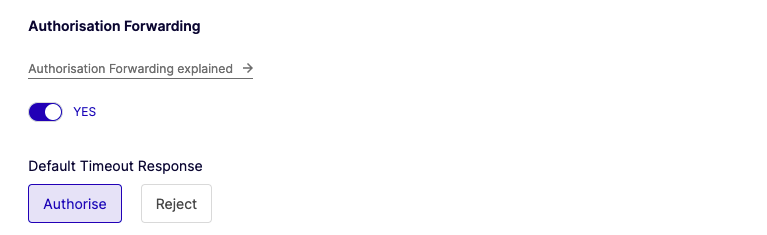
Default Timeout Response can also be set for specific cards using the Weavr API in cases where a specific card needs to have a different Default Timeout Response outcome than the Default Timeout Response outcome set of the Card profileProfileA template defining the configuration for one type of object - corporate identity, consumer identity, managed account, managed card, transfer, or outgoing wire transfer. When you create one of these objects you reference its Profile ID, which tells Weavr which limits, currencies, supported countries, branding, and fees to apply. Your programme ships with one or more Profile IDs per supported object type..
- Set the Authorization Forwarding URL in your app settings. This URL is the base URL where we send you the authorization forwarding webhooks for you to approve or decline.
You may want to change the URL before taking your app live.
- Set up your server endpoint by integrating with Weavr Authorization Forwarding to receive webhooks.
{authforwarding_base_url}/managed_cards_authorisation_request Open reference
We wait for a response to the authorization forwarding webhook for 1.5 seconds. If a response is not received in time, the Default Timeout Response for your app is applied.
- Use the Authforwarding webhooks key from Developers > API credentials in the Portal to ensure the event calls are validated.
Respond to an authorization forwarding webhook
When you receive an authorization forwarding request on your webhook, you should respond directly to the webhook with a 200 HTTP response containing your response choice, either APPROVED or DENIED.
In case you do not manage to send a response in 1.5 seconds, the default timeout response configuration is used. You can set this configuration in our Portal under Settings > InstrumentsInstrumentA financial product owned by a customer. There are two types: Managed Accounts (stored-value accounts that hold balances and can receive wire transfers) and Managed Cards (prepaid cards - virtual or physical - used for purchases). > Managed cardManaged CardA payment card (virtual or physical) that can be created and managed through the Weavr platform. Cards can operate in prepaid mode (with their own balance) or debit mode (linked to a managed account). All cards must be assigned to a card assignee who is an Authorised User., in the profileProfileA template defining the configuration for one type of object - corporate identity, consumer identity, managed account, managed card, transfer, or outgoing wire transfer. When you create one of these objects you reference its Profile ID, which tells Weavr which limits, currencies, supported countries, branding, and fees to apply. Your programme ships with one or more Profile IDs per supported object type.'s authorization forwarding section.
The default timeout response in the card profilesProfileA template defining the configuration for one type of object - corporate identity, consumer identity, managed account, managed card, transfer, or outgoing wire transfer. When you create one of these objects you reference its Profile ID, which tells Weavr which limits, currencies, supported countries, branding, and fees to apply. Your programme ships with one or more Profile IDs per supported object type. must be set in order to enable Authorization forwarding.
You can also define the Default Timeout Response for a specific card by calling the Update card API and setting the authForwardingDefaultTimeoutDecision to either APPROVED or DENIED. The Default Timeout Response configured on the card takes priority over the configuration in the card profileProfileA template defining the configuration for one type of object - corporate identity, consumer identity, managed account, managed card, transfer, or outgoing wire transfer. When you create one of these objects you reference its Profile ID, which tells Weavr which limits, currencies, supported countries, branding, and fees to apply. Your programme ships with one or more Profile IDs per supported object type., if it is set. The individual card default decision timeout is not mandatory.
/managed_cards/{id} /managed_cards/123456789{ "idempotency-ref": "transfer-2026-08-07-001"}{ "tag": "customer-123", "friendlyName": "string", "nameOnCard": "string", "nameOnCardLine2": "string", "billingAddress": { "addressLine1": "1 High Street", "addressLine2": "Flat 2", "city": "London", "postCode": "W1A 1AA", "state": "Greater London", "country": "GB" }, "deliveryAddress": { "name": "Alex", "surname": "Smith", "addressLine1": "1 High Street", "addressLine2": "Flat 2", "city": "London", "postCode": "W1A 1AA", "state": "Greater London", "country": "GB", "contactNumber": {} }, "deliveryMethod": "STANDARD_DELIVERY", "digitalWallets": { "pushProvisioningEnabled": true, "walletsEnabled": true, "artworkReference": "ART_001" }, "authForwardingDefaultTimeoutDecision": "APPROVE", "externalData": [ { "name": "Alex Smith", "value": "INV-1042" } ], "bulkDelivery": true, "activationCode": {}, "productReference": "string", "carrierType": "string", "renewalType": "RENEW", "userId": {}}Default timeout response
Once an authorization has been forwarded, we expect a response within 1.5 seconds from the moment the authorization was forwarded. In case you fail to respond to the webhook on time the default decision timeout operation will be triggered, which you set on the Card profileProfileA template defining the configuration for one type of object - corporate identity, consumer identity, managed account, managed card, transfer, or outgoing wire transfer. When you create one of these objects you reference its Profile ID, which tells Weavr which limits, currencies, supported countries, branding, and fees to apply. Your programme ships with one or more Profile IDs per supported object type. on the portal to either approve or decline in case a response is not received.
POST/managed_cards/authorisations/watch