Spend controls
Learn how to set rules on cards and card profilesProfileA template defining the configuration for one type of object - corporate identity, consumer identity, managed account, managed card, transfer, or outgoing wire transfer. When you create one of these objects you reference its Profile ID, which tells Weavr which limits, currencies, supported countries, branding, and fees to apply. Your programme ships with one or more Profile IDs per supported object type. to control spending.
Spend rules can be used to block certain card purchases. You can configure them at either the card profileProfileA template defining the configuration for one type of object - corporate identity, consumer identity, managed account, managed card, transfer, or outgoing wire transfer. When you create one of these objects you reference its Profile ID, which tells Weavr which limits, currencies, supported countries, branding, and fees to apply. Your programme ships with one or more Profile IDs per supported object type. level in the Weavr Portal or at individual card level by using the following APIs.
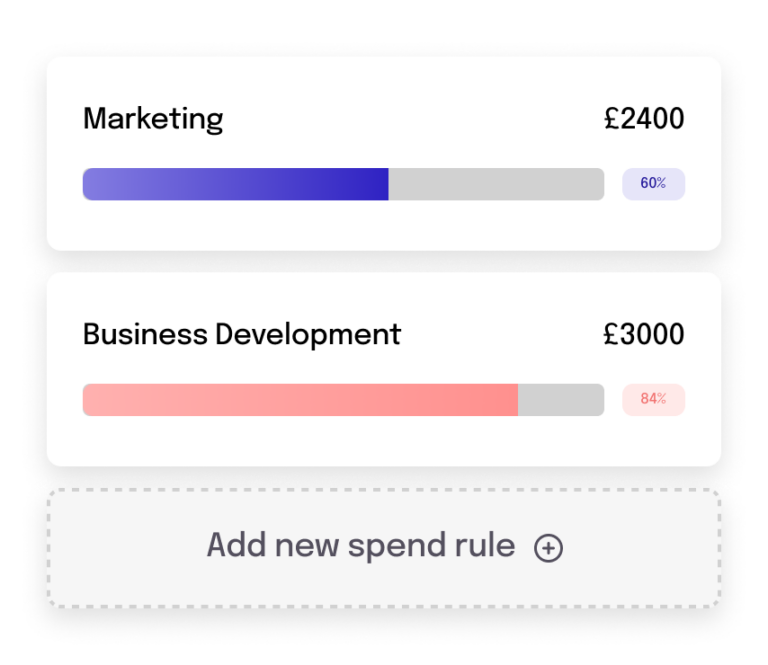
Supported card spend rules
Merchant rules
You can use merchant rules to block or allow merchant categories (e.g. shoe stores) or specific merchants.
| Field | Description |
|---|---|
allowedMerchantCategories | A list of merchant categories from where purchases are allowed. All other categories will be blocked. |
blockedMerchantCategories | A list of merchant categories from where purchases should be blocked. All other categories will be allowed. |
allowedMerchantIds | A list of merchant IDs from where purchases should be allowed. All other merchants will be blocked. |
blockedMerchantIds | A list of merchant IDs from where purchases should be blocked. All other merchants will be allowed. |
allowedMerchantCountries | A list of countries from where merchants should be allowed. All other countries will be blocked. |
blockedMerchantCountries | A list of countries from where merchants should be blocked. All other countries will be allowed. |
minTransactionAmount | The minimum transaction amount in the card currency that is allowed. Transactions with an amount less than the value set are declined. |
maxTransactionAmount | The maximum transaction amount in the card currency that is allowed. Transactions with an amount greater than the value set are declined. |
If you set the same category or ID in the allowed and blocked lists, the purchase will be denied.
Transaction type rules
Card assigneesCard AssigneeThe person that a card is assigned to and who will use the card. For consumers, the card owner and card assignee are the same person. For corporates, the card assignee and card owner are different entities - the corporate is the card owner and the person using the card is the card assignee. Card assignees must be created as Authorised Users. can initiate different types of transactions (e.g. ATM withdrawals) using their cards. You can use spend controls to limit allowed transaction types.
| Field | Description |
|---|---|
allowContactless | Purchases can be authorized without the need for the card assigneeCard AssigneeThe person that a card is assigned to and who will use the card. For consumers, the card owner and card assignee are the same person. For corporates, the card assignee and card owner are different entities - the corporate is the card owner and the person using the card is the card assignee. Card assignees must be created as Authorised Users. to swipe the card, enter the PINPIN (Personal Identification Number). Personal Identification Number - the numeric code a cardholder enters to authorize chip-and-PIN purchases and ATM withdrawals. PIN is only present on physical managed cards. Weavr returns it tokenized on `GET /managed_cards/{id}` (with a stepped-up token), and the SDK detokenizes it inside a secure PIN display component., and/or sign for the transaction. If not set, contactless transactions are allowed. |
allowATM | Card assigneesCard AssigneeThe person that a card is assigned to and who will use the card. For consumers, the card owner and card assignee are the same person. For corporates, the card assignee and card owner are different entities - the corporate is the card owner and the person using the card is the card assignee. Card assignees must be created as Authorised Users. can withdraw funds from the card using an ATM. If not set, ATM withdrawals are allowed. |
allowECommerce | Card assigneesCard AssigneeThe person that a card is assigned to and who will use the card. For consumers, the card owner and card assignee are the same person. For corporates, the card assignee and card owner are different entities - the corporate is the card owner and the person using the card is the card assignee. Card assignees must be created as Authorised Users. can initiate purchases from online e-commerce portals. If not set, e-commerce transactions are allowed. |
allowCashback | Card assigneesCard AssigneeThe person that a card is assigned to and who will use the card. For consumers, the card owner and card assignee are the same person. For corporates, the card assignee and card owner are different entities - the corporate is the card owner and the person using the card is the card assignee. Card assignees must be created as Authorised Users. can ask for a cashback transaction at a point-of-sale. If not set, cashback transactions are allowed. |
allowCreditAuthorisations | Card assigneesCard AssigneeThe person that a card is assigned to and who will use the card. For consumers, the card owner and card assignee are the same person. For corporates, the card assignee and card owner are different entities - the corporate is the card owner and the person using the card is the card assignee. Card assignees must be created as Authorised Users. can receive funds directly on the card. If not set, credit transactions are allowed. |
Spend limits
You can set spend limits for debit mode cards to limit the amount that can be spent on the card. Spend limits can be configured for different intervals
| Field | Description |
|---|---|
DAILY | The daily total spend allowed starting at 00:00:00 UTC. |
WEEKLY | The weekly total spend allowed starting on Monday 00:00:00 UTC. |
MONTHLY | The monthly total spend allowed starting on the first day of the month at 00:00:00 UTC. |
QUARTERLY | The quarterly total spend allowed starting on the first day of the first month in the quarter at 00:00:00 UTC. |
YEARLY | The yearly total spend allowed starting on the first day of the year at 00:00:00 UTC. |
ALWAYS | The total spend allowed in the lifetime of the card. |
Spend rules levels
There are three levels of spend rules, each one having priority over the following ones, starting from the Identity then Profile and lastly the Card level spend rules.
| Spend Rule Levels | Description |
|---|---|
Identity | The highest level of spend rules that is applied on the customer and it is decided based on the KYCKYC (Know Your Customer). Know Your Customer - the identity verification process for consumer customers. This process allows you to securely verify your user's identity. Weavr asks users to submit the information and documentation they need for approval by financial providers. results |
Profile | The profileProfileA template defining the configuration for one type of object - corporate identity, consumer identity, managed account, managed card, transfer, or outgoing wire transfer. When you create one of these objects you reference its Profile ID, which tells Weavr which limits, currencies, supported countries, branding, and fees to apply. Your programme ships with one or more Profile IDs per supported object type. spend rules is enforced on the profileProfileA template defining the configuration for one type of object - corporate identity, consumer identity, managed account, managed card, transfer, or outgoing wire transfer. When you create one of these objects you reference its Profile ID, which tells Weavr which limits, currencies, supported countries, branding, and fees to apply. Your programme ships with one or more Profile IDs per supported object type. level and all rules will have precedence over the rules the cards have under the profileProfileA template defining the configuration for one type of object - corporate identity, consumer identity, managed account, managed card, transfer, or outgoing wire transfer. When you create one of these objects you reference its Profile ID, which tells Weavr which limits, currencies, supported countries, branding, and fees to apply. Your programme ships with one or more Profile IDs per supported object type. |
Card | The card rules are applied individually to each card assuming that there are no conflicts with the rules applied on the Identity and ProfileProfileA template defining the configuration for one type of object - corporate identity, consumer identity, managed account, managed card, transfer, or outgoing wire transfer. When you create one of these objects you reference its Profile ID, which tells Weavr which limits, currencies, supported countries, branding, and fees to apply. Your programme ships with one or more Profile IDs per supported object type. level rules which have precedence over the card rules |
Configure card spend rules on individual cards
You can control the spend rules on individual cards in these 4 steps:
- Setup card spend rules.
- Update card spend rules.
- Retrieve all spend rules.
- Reset card spend rules.
1. Setup card spend rules
When setting up spend rules on a card for the first time you need to use the Setup operation. Any number of spend rules can be added during this step but at least one spend rule needs to be set.
/managed_cards/{id}/spend_rules /managed_cards/123456789/spend_rules{ "idempotency-ref": "transfer-2026-08-07-001"}{ "allowedMerchantCategories": [ "string" ], "blockedMerchantCategories": [ "string" ], "allowedMerchantIds": [ "string" ], "blockedMerchantIds": [ "string" ], "allowedMerchantCountries": [ "string" ], "blockedMerchantCountries": [ "string" ], "allowContactless": true, "allowAtm": true, "allowECommerce": true, "allowCashback": true, "allowCreditAuthorisations": true, "rolloverPolicy": { "rolloverNegative": false }, "spendLimit": [ { "startTimestamp": 1767225600000, "value": { "currency": "GBP", "amount": 1250 }, "interval": "DAILY" } ], "minTransactionAmount": 100, "maxTransactionAmount": 50000}For subsequent changes to the spend rules of a card, you should use the update card spend rules operation.
Custom spend limit start dates
When creating or updating a spend rule, the corporate root or authorized users can define a custom start date for spend limits using the spendLimit.startTimestamp field.
This timestamp sets the start of the selected spend interval, whether weekly, monthly, quarterly, or yearly giving you greater flexibility to align spend controls with your financial planning cycles.
The following examples illustrate how spendLimit.startTimestamp behaves in scenarios involving end-of-month dates and leap years.
Yearly spend limit
Scenario: €500 yearly limit starting on May 1, 2025, 00:00:00 UTC, and ending on April 30, 2026, 23:59:59 UTC.
"spendLimit": [
  {
    "value": {
      "currency": "EUR",
      "amount": 500000
    },
    "startTimestamp": 1746057600000,
    "interval": "YEARLY"
  }
]
Monthly spend limit example starting on the 31 st of August
Scenario: €100 monthly limit starting on August 31, 2025, 13:00 UTC, and ending on September 30, 2025, 23:59:59 UTC.
"spendLimit": [
  {
    "value": {
      "currency": "EUR",
      "amount": 100000
    },
    "startTimestamp": 1756645200000,
    "interval": "MONTHLY"
  }
]
Monthly spend limit example starting on the 30 th of September
Scenario: €100 monthly limit starting on September 30, 2025, 13:00 UTC, and ending on October 29, 2025, 23:59:59 UTC.
"spendLimit": [
  {
    "value": {
      "currency": "EUR",
      "amount": 100000
    },
    "startTimestamp": 1759237200000,
    "interval": "MONTHLY"
  }
]
Leap year example
Scenario: €100 monthly limit starting on February 29, 2028, 13:00 UTC (leap year), ending on March 28, 2028, 23:59:59 UTC.
"spendLimit": [
  {
    "value": {
      "currency": "EUR",
      "amount": 100000
    },
    "startTimestamp": 1835442000000,
    "interval": "MONTHLY"
  }
]
Non-leap year example
Scenario: €100 monthly limit starting on February 28, 2026, 13:00 UTC, and ending on March 27, 2026, 23:59:59 UTC.
"spendLimit": [
  {
    "value": {
      "currency": "EUR",
      "amount": 100000
    },
    "startTimestamp": 1772283600000,
    "interval": "MONTHLY"
  }
]
When a card is replaced due to being lost, stolen, or damaged, or when a card is renewed-the new card inherits the same spending limit as the previous card. The available balance at the time of replacement or renewal is carried over and reflected on the new card, ensuring continuity of access to funds.
2. Update card spend rules
You should use this operation to update spend rules for cards which you have already configured rules for. When updating rules, you only need to include the rules that you want to set and can omit any rules which you are not interested in.
/managed_cards/{id}/spend_rules /managed_cards/123456789/spend_rules{ "idempotency-ref": "transfer-2026-08-07-001"}{ "allowedMerchantCategories": [ "string" ], "blockedMerchantCategories": [ "string" ], "allowedMerchantIds": [ "string" ], "blockedMerchantIds": [ "string" ], "allowedMerchantCountries": [ "string" ], "blockedMerchantCountries": [ "string" ], "allowContactless": true, "allowAtm": true, "allowECommerce": true, "allowCashback": true, "allowCreditAuthorisations": true, "rolloverPolicy": { "rolloverNegative": false }, "spendLimit": [ { "startTimestamp": 1767225600000, "value": { "currency": "GBP", "amount": 1250 }, "interval": "DAILY" } ], "minTransactionAmount": 100, "maxTransactionAmount": 50000, "updateSpendLimitMethod": "OVERWRITE"}3. Retrieve all spend rules
Retrieve all spend rules associated with a card. The spend rules returned will include the ones configured in the setup card spend rules API and the update card spend rules API as well as spend rules configured in the card profileProfileA template defining the configuration for one type of object - corporate identity, consumer identity, managed account, managed card, transfer, or outgoing wire transfer. When you create one of these objects you reference its Profile ID, which tells Weavr which limits, currencies, supported countries, branding, and fees to apply. Your programme ships with one or more Profile IDs per supported object type. or identity.
/managed_cards/{id}/spend_rules /managed_cards/123456789/spend_rulesOnly the rules that have been set will be returned when retrieving spend rules.
4. Reset card spend rules
Use the reset operation to remove all card level spend rules at once.
/managed_cards/{id}/spend_rules /managed_cards/123456789/spend_rulesSpend rules configured in the card profileProfileA template defining the configuration for one type of object - corporate identity, consumer identity, managed account, managed card, transfer, or outgoing wire transfer. When you create one of these objects you reference its Profile ID, which tells Weavr which limits, currencies, supported countries, branding, and fees to apply. Your programme ships with one or more Profile IDs per supported object type. or at identity level will not be affected by this API and will continue to be checked accordingly.
Configure spend rules in card profiles
You can set spend rules at the card profileProfileA template defining the configuration for one type of object - corporate identity, consumer identity, managed account, managed card, transfer, or outgoing wire transfer. When you create one of these objects you reference its Profile ID, which tells Weavr which limits, currencies, supported countries, branding, and fees to apply. Your programme ships with one or more Profile IDs per supported object type. level on the Weavr Portal > Settings page, in the card profileProfileA template defining the configuration for one type of object - corporate identity, consumer identity, managed account, managed card, transfer, or outgoing wire transfer. When you create one of these objects you reference its Profile ID, which tells Weavr which limits, currencies, supported countries, branding, and fees to apply. Your programme ships with one or more Profile IDs per supported object type. configuration section as shown in the following screenshot. All cards associated with a card profileProfileA template defining the configuration for one type of object - corporate identity, consumer identity, managed account, managed card, transfer, or outgoing wire transfer. When you create one of these objects you reference its Profile ID, which tells Weavr which limits, currencies, supported countries, branding, and fees to apply. Your programme ships with one or more Profile IDs per supported object type. will inherit the spend rules specified in its card profileProfileA template defining the configuration for one type of object - corporate identity, consumer identity, managed account, managed card, transfer, or outgoing wire transfer. When you create one of these objects you reference its Profile ID, which tells Weavr which limits, currencies, supported countries, branding, and fees to apply. Your programme ships with one or more Profile IDs per supported object type..
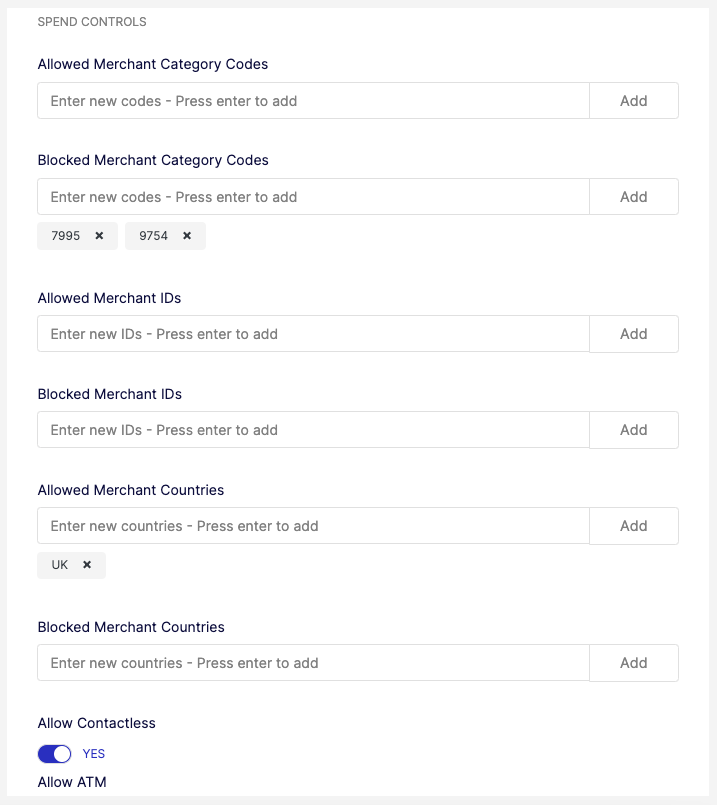
Spend rules set at the card profileProfileA template defining the configuration for one type of object - corporate identity, consumer identity, managed account, managed card, transfer, or outgoing wire transfer. When you create one of these objects you reference its Profile ID, which tells Weavr which limits, currencies, supported countries, branding, and fees to apply. Your programme ships with one or more Profile IDs per supported object type. level are effective for all cards linked to the profileProfileA template defining the configuration for one type of object - corporate identity, consumer identity, managed account, managed card, transfer, or outgoing wire transfer. When you create one of these objects you reference its Profile ID, which tells Weavr which limits, currencies, supported countries, branding, and fees to apply. Your programme ships with one or more Profile IDs per supported object type.. We check spend rules set at the card level at the same time that it checks card profileProfileA template defining the configuration for one type of object - corporate identity, consumer identity, managed account, managed card, transfer, or outgoing wire transfer. When you create one of these objects you reference its Profile ID, which tells Weavr which limits, currencies, supported countries, branding, and fees to apply. Your programme ships with one or more Profile IDs per supported object type. rules.
Review all level spend rules
You can see all the spend rules applied on a card across all spend rule levels (Identity, ProfileProfileA template defining the configuration for one type of object - corporate identity, consumer identity, managed account, managed card, transfer, or outgoing wire transfer. When you create one of these objects you reference its Profile ID, which tells Weavr which limits, currencies, supported countries, branding, and fees to apply. Your programme ships with one or more Profile IDs per supported object type., Card) in the Weavr Portal Console, on the card's detail panel.
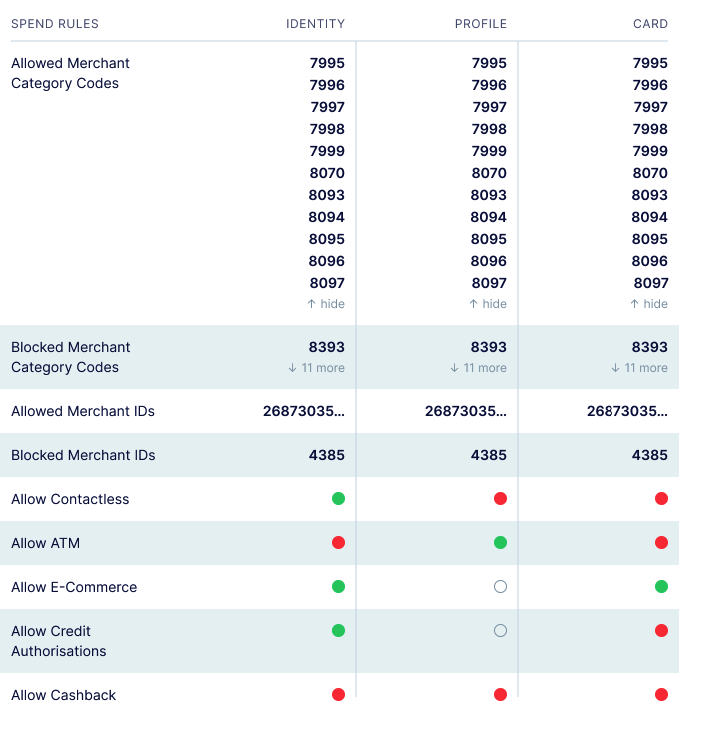
If any one of the rules rejects the card purchase, the transaction is declined.