Authenticate as an Embedder
For a single reference covering every key and ID you need to integrate Weavr - including the UI keyUI keyA public key that authorizes Weavr's Secure UI components - the inputs and displays in our Web, Android, iOS, and React Native SDKs that handle passwords, PINs, card details, and KYC/KYB flows. Unlike the API key, the UI key isn't an API credential; you don't call REST endpoints with it. It's safe to embed in client-side code, and Sandbox and Live each have their own UI key., programmeProgrammeA programme represents your application within Weavr. Everything you create - customers, instruments, and transactions - sits beneath a programme. When you register as an Embedder, you receive a programme in the Sandbox and, once approved, one in Live. A programme is not a Workspace: a workspace is your company's account, and it can hold several programmes. ID, and profileProfileA template defining the configuration for one type of object - corporate identity, consumer identity, managed account, managed card, transfer, or outgoing wire transfer. When you create one of these objects you reference its Profile ID, which tells Weavr which limits, currencies, supported countries, branding, and fees to apply. Your programme ships with one or more Profile IDs per supported object type. IDs - see Keys and IDs.
We authenticate your API requests using your API keys. This identifies your backend as an EmbedderEmbedder (Embedded Finance Provider). A company or developer that integrates Weavr's embedded finance services into their own application to provide financial services to their end customers., independently of the end user acting through your app. If you do not include your key when making an API request or you include an invalid API key, we respond with a 401 - Unauthorized HTTP error.
Most financial operations also need an end-user Access Token. See Authenticate your users for that separate flow.
When you open a Sandbox account, we generate keys for you. You can use these keys in the Sandbox environment only. These are different from the keys for the Live environment, which you receive later.
We provide you with two types of keys:
- Use your API key to authenticate yourself when you make API requests. You should keep this key secret and should only store it securely on your servers. You should never use this key to call Weavr’s APIs directly from the UI.
- Use your UI keyUI keyA public key that authorizes Weavr's Secure UI components - the inputs and displays in our Web, Android, iOS, and React Native SDKs that handle passwords, PINs, card details, and KYC/KYB flows. Unlike the API key, the UI key isn't an API credential; you don't call REST endpoints with it. It's safe to embed in client-side code, and Sandbox and Live each have their own UI key. to identify your account when you use Weavr’s UI component library. This key isn’t secret and therefore you can store it in your JavaScript code or in an Android or iOS app.
Obtaining your keys
Your keys are generated automatically when your account is set up. You can find your keys in the Embedder Portal. Remember that a different set of keys is generated when you upgrade your account to the Live environment.
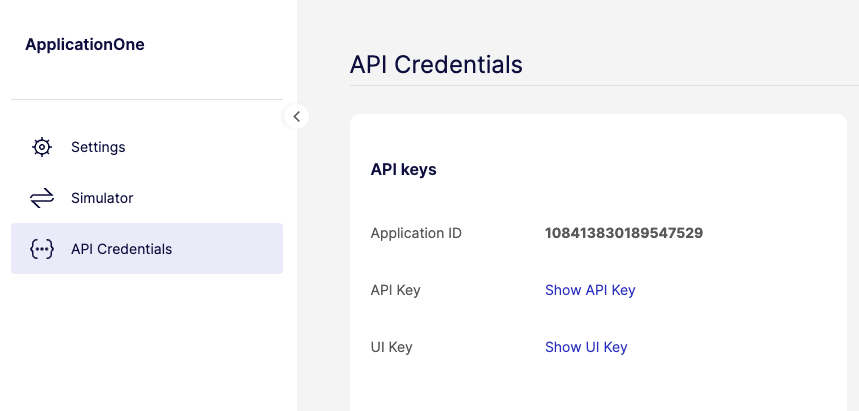
In total, you have 4 keys: an API key and a UI keyUI keyA public key that authorizes Weavr's Secure UI components - the inputs and displays in our Web, Android, iOS, and React Native SDKs that handle passwords, PINs, card details, and KYC/KYB flows. Unlike the API key, the UI key isn't an API credential; you don't call REST endpoints with it. It's safe to embed in client-side code, and Sandbox and Live each have their own UI key. for the Sandbox environment and an API key and a UI keyUI keyA public key that authorizes Weavr's Secure UI components - the inputs and displays in our Web, Android, iOS, and React Native SDKs that handle passwords, PINs, card details, and KYC/KYB flows. Unlike the API key, the UI key isn't an API credential; you don't call REST endpoints with it. It's safe to embed in client-side code, and Sandbox and Live each have their own UI key. for the Live environment.
Using your keys
You should include the API key in the header of every API request. The name of the header is api-key and its value should be your API key.
You should include the UI keyUI keyA public key that authorizes Weavr's Secure UI components - the inputs and displays in our Web, Android, iOS, and React Native SDKs that handle passwords, PINs, card details, and KYC/KYB flows. Unlike the API key, the UI key isn't an API credential; you don't call REST endpoints with it. It's safe to embed in client-side code, and Sandbox and Live each have their own UI key. when initializing the UI library by calling the init method.