Simulator
Before you push your app to the Live environment, you should test your integration to make sure it handles flows correctly.
Use the simulator in your Sandbox Weavr Portal to simulate processes and transactions that cannot be triggered by the integration alone such as a purchase on a card or a deposit on an IBANIBAN (International Bank Account Number). International Bank Account Number - a standardized international bank account identifier. Managed accounts can be assigned an IBAN to enable wire transfers to and from bank accounts outside of Weavr. IBANs are required for EUR accounts and enable SEPA transfers..
You can also build automated tests by triggering the simulator through the simulator API.
Identity verification
After you register a corporate or a consumer, you can simulate the approval of their KYBKYB (Know Your Business). Know Your Business - the identity verification process for corporate customers. This process allows you to securely verify your business customer's identity. Weavr asks users to submit the information and documentation they need for approval by financial providers. or KYCKYC (Know Your Customer). Know Your Customer - the identity verification process for consumer customers. This process allows you to securely verify your user's identity. Weavr asks users to submit the information and documentation they need for approval by financial providers. verification.
Consumer KYC verification
When you create a consumer, the KYCKYC (Know Your Customer). Know Your Customer - the identity verification process for consumer customers. This process allows you to securely verify your user's identity. Weavr asks users to submit the information and documentation they need for approval by financial providers. status of the customer fullDueDiligence is NOT-STARTED. To lift customer restrictions and change fullDueDiligence to APPROVED, you can simulate KYCKYC (Know Your Customer). Know Your Customer - the identity verification process for consumer customers. This process allows you to securely verify your user's identity. Weavr asks users to submit the information and documentation they need for approval by financial providers. verification as follows:
Using the simulator API
# Replace $WEAVR_API_KEY with your API key, found under API clients in the Weavr Portal account menu.
# Replace $CONSUMER_ID with the value of the `id.id` field of the response object returned when you created the consumer.
curl --location --request POST 'https://sandbox.weavr.io/simulate/api/consumers/{{$CONSUMER_ID}}/verify' \
--header 'Content-Type: application/json' \
--header 'programme-key: {{$WEAVR_API_KEY}}' \
--data-raw '{}'
Using the simulator UI
- Open Simulator > Verify consumer (KYC) in the Weavr Sandbox Portal.
- Input the consumer ID that you would like to KYCKYC (Know Your Customer). Know Your Customer - the identity verification process for consumer customers. This process allows you to securely verify your user's identity. Weavr asks users to submit the information and documentation they need for approval by financial providers. verify and click on Simulate.
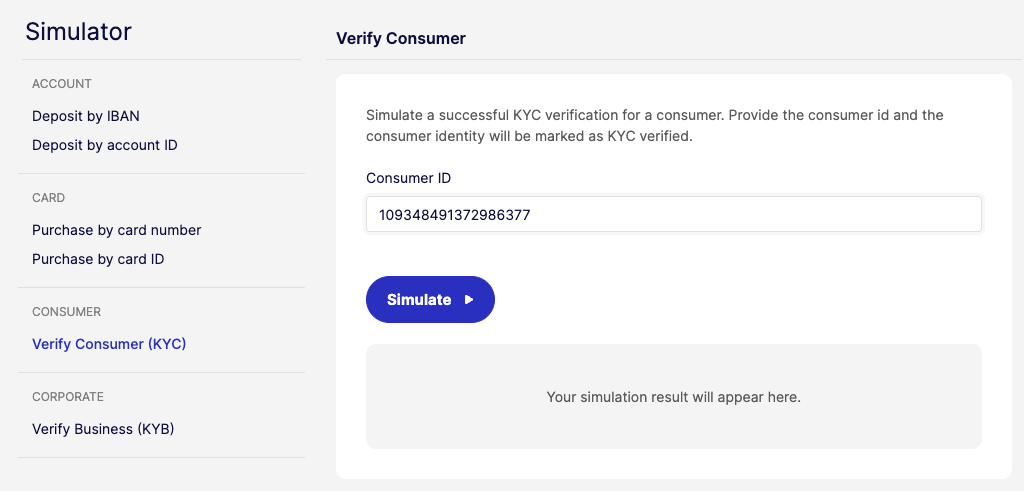
You can find the consumer ID of a consumer in the Console, on the consumer's detail page.
KYB verification
When you create a corporate, the KYBKYB (Know Your Business). Know Your Business - the identity verification process for corporate customers. This process allows you to securely verify your business customer's identity. Weavr asks users to submit the information and documentation they need for approval by financial providers. status of the customer fullCompanyChecksVerified is NOT-STARTED. To lift customer restrictions and change fullCompanyChecksVerified to APPROVED, you can simulate KYBKYB (Know Your Business). Know Your Business - the identity verification process for corporate customers. This process allows you to securely verify your business customer's identity. Weavr asks users to submit the information and documentation they need for approval by financial providers. verification as follows:
Using the simulator API
# Replace $WEAVR_API_KEY with your API key, found under API clients in the Weavr Portal account menu.
# Replace $CORPORATE_ID with the value of the `id.id` field of the response object returned when you created the corporate.
curl --location --request POST 'https://sandbox.weavr.io/simulate/api/corporates/{{$CORPORATE_ID}}/verify' \
--header 'Content-Type: application/json' \
--header 'programme-key: {{$WEAVR_API_KEY}}' \
--data-raw '{}'
Using the simulator UI
- Open Simulator > Verify business (KYB) in the Weavr Sandbox Portal.
- Input the corporate ID that you would like to KYBKYB (Know Your Business). Know Your Business - the identity verification process for corporate customers. This process allows you to securely verify your business customer's identity. Weavr asks users to submit the information and documentation they need for approval by financial providers. verify and click on Simulate.
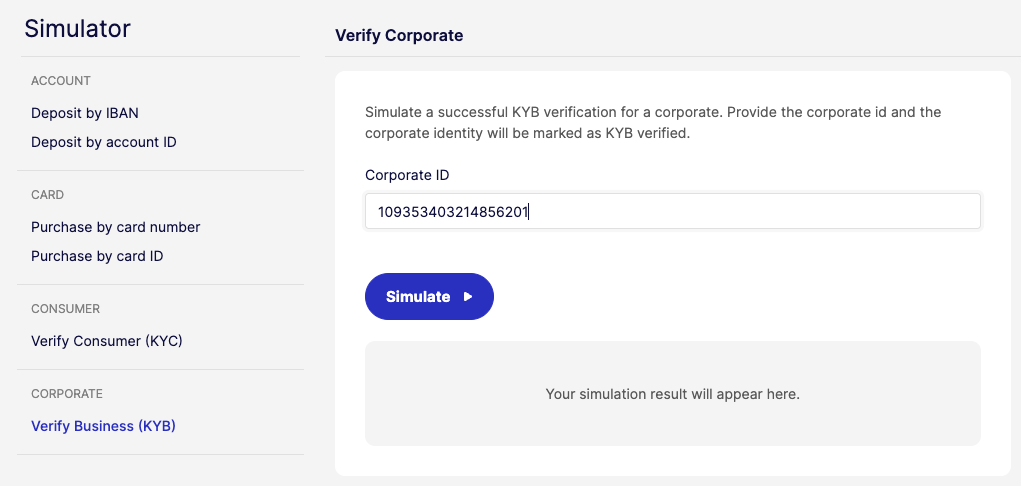
You can find the corporate ID of a corporate in the Console, on the corporate's detail page.
Incoming wire transfer
Managed accounts that have an IBANIBAN (International Bank Account Number). International Bank Account Number - a standardized international bank account identifier. Managed accounts can be assigned an IBAN to enable wire transfers to and from bank accounts outside of Weavr. IBANs are required for EUR accounts and enable SEPA transfers. (EUR or USD) or a sort code and account number (GBP) can receive incoming wire transfersWire TransferA transaction that moves funds between accounts. An incoming wire transfer moves funds from a third-party bank account to a Weavr managed account, while an outgoing wire transfer moves funds from a Weavr managed account to a third-party bank account. Wire transfers require the managed account to have an assigned IBAN (for EUR) or sort code and account number (for GBP). from an external bank account.
When we receive a new incoming wire transfer, it is processed according to the configuration of your app, based on the financial services your embedded finance program supports.
Various scenarios can be simulated from the "Incoming Wire TransferWire TransferA transaction that moves funds between accounts. An incoming wire transfer moves funds from a third-party bank account to a Weavr managed account, while an outgoing wire transfer moves funds from a Weavr managed account to a third-party bank account. Wire transfers require the managed account to have an assigned IBAN (for EUR) or sort code and account number (for GBP). (IWTIWT (Incoming Wire Transfer). Incoming Wire Transfer - a transaction that occurs when funds from a bank account held at a third-party financial institution are moved to a Weavr managed account. IWTs are initiated externally by the owner of the source bank account, and the managed account must have an assigned IBAN to receive funds.) processing" screen; and the processing of the transaction depends on where the payment originates from, and what the destination Managed AccountManaged AccountAn account held at a financial institution that can be created and managed through the Weavr platform. Each account has a balance where customers can hold funds. Optionally, an IBAN can be assigned to enable wire transfers to bank accounts outside of Weavr. can accept. Example scenarios are:
- IWTsIWT (Incoming Wire Transfer). Incoming Wire Transfer - a transaction that occurs when funds from a bank account held at a third-party financial institution are moved to a Weavr managed account. IWTs are initiated externally by the owner of the source bank account, and the managed account must have an assigned IBAN to receive funds. with specific sender-information
- IWTsIWT (Incoming Wire Transfer). Incoming Wire Transfer - a transaction that occurs when funds from a bank account held at a third-party financial institution are moved to a Weavr managed account. IWTs are initiated externally by the owner of the source bank account, and the managed account must have an assigned IBAN to receive funds. that create or resolve a Linked Account
- IWT Forwarding Event
Once processing is successful, the funds are credited to the managed accountManaged AccountAn account held at a financial institution that can be created and managed through the Weavr platform. Each account has a balance where customers can hold funds. Optionally, an IBAN can be assigned to enable wire transfers to bank accounts outside of Weavr. and we send a deposit webhook to your app.
Simulate IWT by account ID via the Portal
If you need to quickly credit a Managed AccountManaged AccountAn account held at a financial institution that can be created and managed through the Weavr platform. Each account has a balance where customers can hold funds. Optionally, an IBAN can be assigned to enable wire transfers to bank accounts outside of Weavr., for example when setting up a test, you can bypass the standard processing flow by using the "IWTIWT (Incoming Wire Transfer). Incoming Wire Transfer - a transaction that occurs when funds from a bank account held at a third-party financial institution are moved to a Weavr managed account. IWTs are initiated externally by the owner of the source bank account, and the managed account must have an assigned IBAN to receive funds. by Account ID" feature in our Sandbox portal. This method allows you to directly apply funds to the account without simulating a realistic payment journey, making it ideal for setting up test scenarios efficiently.
To apply funds via IWTIWT (Incoming Wire Transfer). Incoming Wire Transfer - a transaction that occurs when funds from a bank account held at a third-party financial institution are moved to a Weavr managed account. IWTs are initiated externally by the owner of the source bank account, and the managed account must have an assigned IBAN to receive funds. by account ID:
- Open Simulator > IWTIWT (Incoming Wire Transfer). Incoming Wire Transfer - a transaction that occurs when funds from a bank account held at a third-party financial institution are moved to a Weavr managed account. IWTs are initiated externally by the owner of the source bank account, and the managed account must have an assigned IBAN to receive funds. by account ID in the Weavr Sandbox Portal.
- Fill out the form with the required details and click Simulate.
Using the simulator API
# Replace $WEAVR_API_KEY with your API key, found under API clients in the Weavr Portal account menu.
# For USD IWTs, replace $USD_IBAN with the value of the `bankAccountDetails.details.iban` field  in the response object returned by managedAccountIBANGet.
# For USD IWTs, replace $PAYMENT_REFERENCE with the value of the `bankAccountDetails.paymentReference` field in the response object returned by managedAccountIBANGet.
# Replace $CURRENCY with the ISO-4217 code of the deposit currency that you would like to simulate.
# Replace $IWT_AMOUNT with the incoming wire transfer amount that you would like to simulate. The amount should be scaled to the lowest denomination of the currency.
# For EUR IWTs, replace $EUR_IBAN with the value of the `bankAccountDetails.details.iban` field  in the response object returned by managedAccountIBANGet.
# For GBP IWTs, replace $SORT_CODE with the value of the `bankAccountDetails.details.sortCode` field  in the response object returned by managedAccountIBANGet.
# For GBP IWTs, replace $ACCOUNT_NUMBER with the value of the `bankAccountDetails.details.accountNumber` field  in the response object returned by managedAccountIBANGet.
curl --location --request POST 'https://sandbox.weavr.io/simulate/api/accounts/deposit' \
--header 'Content-Type: application/json' \
--header 'programme-key: {{$WEAVR_API_KEY}}' \
--data-raw '{
  "iban": "{{$USD_IBAN}}",
  "paymentReference": "{{$PAYMENT_REFERENCE}}",
  "depositAmount": {
    "currency": "{{$CURRENCY}}",
    "amount": "{{$IWT_AMOUNT}}"
  },
  "destinationIbanDetails": {
    "iban": "{{$EUR_IBAN}}"
  },
  "destinationFasterPaymentsDetails": {
    "sortCode": "{{$SORT_CODE}}",
    "accountNumber": "{{$ACCOUNT_NUMBER}}"
  }
}'
Simulate IWT processing via the Portal
You can use the Sandbox Portal to simulate Incoming Wire TransfersWire TransferA transaction that moves funds between accounts. An incoming wire transfer moves funds from a third-party bank account to a Weavr managed account, while an outgoing wire transfer moves funds from a Weavr managed account to a third-party bank account. Wire transfers require the managed account to have an assigned IBAN (for EUR) or sort code and account number (for GBP). for the following scenarios:
-
IWTsIWT (Incoming Wire Transfer). Incoming Wire Transfer - a transaction that occurs when funds from a bank account held at a third-party financial institution are moved to a Weavr managed account. IWTs are initiated externally by the owner of the source bank account, and the managed account must have an assigned IBAN to receive funds. that create Linked AccountsLinked AccountAn entity in the Weavr system that represents an external bank account or payment service provider (PSP) account that a customer has verified they own and control. This feature enables users to perform transactions, such as outgoing and incoming wire transfers, between their Linked Accounts and their Managed Accounts as 'self-to-self' transfers. On a programmeProgrammeA programme represents your application within Weavr. Everything you create - customers, instruments, and transactions - sits beneath a programme. When you register as an Embedder, you receive a programme in the Sandbox and, once approved, one in Live. A programme is not a Workspace: a workspace is your company's account, and it can hold several programmes. restricted to self-to-self transfers, the sender name you enter drives the linked account outcome - an exact match on the customer name produces an
ACTIVElinked accountLinked AccountAn entity in the Weavr system that represents an external bank account or payment service provider (PSP) account that a customer has verified they own and control. This feature enables users to perform transactions, such as outgoing and incoming wire transfers, between their Linked Accounts and their Managed Accounts as 'self-to-self' transfers., and any other name producesPENDING_VERIFICATION. The amount doesn't affect the outcome. -
IWTIWT (Incoming Wire Transfer). Incoming Wire Transfer - a transaction that occurs when funds from a bank account held at a third-party financial institution are moved to a Weavr managed account. IWTs are initiated externally by the owner of the source bank account, and the managed account must have an assigned IBAN to receive funds. Forwarding Event You can also simulate scenarios involving forwarding of incoming wire transfersWire TransferA transaction that moves funds between accounts. An incoming wire transfer moves funds from a third-party bank account to a Weavr managed account, while an outgoing wire transfer moves funds from a Weavr managed account to a third-party bank account. Wire transfers require the managed account to have an assigned IBAN (for EUR) or sort code and account number (for GBP)..
An exact sender name match behaves the same in sandbox as in production: the linked accountLinked AccountAn entity in the Weavr system that represents an external bank account or payment service provider (PSP) account that a customer has verified they own and control. This feature enables users to perform transactions, such as outgoing and incoming wire transfers, between their Linked Accounts and their Managed Accounts as 'self-to-self' transfers. is created ACTIVE and the transfer settles as a funding transaction.
A close match or no match doesn't. Sandbox creates the linked accountLinked AccountAn entity in the Weavr system that represents an external bank account or payment service provider (PSP) account that a customer has verified they own and control. This feature enables users to perform transactions, such as outgoing and incoming wire transfers, between their Linked Accounts and their Managed Accounts as 'self-to-self' transfers. in PENDING_VERIFICATION, but it can't hold the transfer for compliance monitoring the way production does. No review follows, and no approve or reject decision is made - so the resulting ACTIVE or REJECTED linked accountLinked AccountAn entity in the Weavr system that represents an external bank account or payment service provider (PSP) account that a customer has verified they own and control. This feature enables users to perform transactions, such as outgoing and incoming wire transfers, between their Linked Accounts and their Managed Accounts as 'self-to-self' transfers. states, and the reclassification of the transfer to funding on approval, can't be reproduced in sandbox.
These outcomes still occur in production, and they change whether a wire transferWire TransferA transaction that moves funds between accounts. An incoming wire transfer moves funds from a third-party bank account to a Weavr managed account, while an outgoing wire transfer moves funds from a Weavr managed account to a third-party bank account. Wire transfers require the managed account to have an assigned IBAN (for EUR) or sort code and account number (for GBP). is categorized as funding or as a third-party IWTIWT (Incoming Wire Transfer). Incoming Wire Transfer - a transaction that occurs when funds from a bank account held at a third-party financial institution are moved to a Weavr managed account. IWTs are initiated externally by the owner of the source bank account, and the managed account must have an assigned IBAN to receive funds. - so account for them even though you can't trigger them here.
To simulate an IWTIWT (Incoming Wire Transfer). Incoming Wire Transfer - a transaction that occurs when funds from a bank account held at a third-party financial institution are moved to a Weavr managed account. IWTs are initiated externally by the owner of the source bank account, and the managed account must have an assigned IBAN to receive funds.:
- Open Simulator > IWTIWT (Incoming Wire Transfer). Incoming Wire Transfer - a transaction that occurs when funds from a bank account held at a third-party financial institution are moved to a Weavr managed account. IWTs are initiated externally by the owner of the source bank account, and the managed account must have an assigned IBAN to receive funds. processing in the Weavr Sandbox Portal.
- Input the details in the form and click on Simulate.
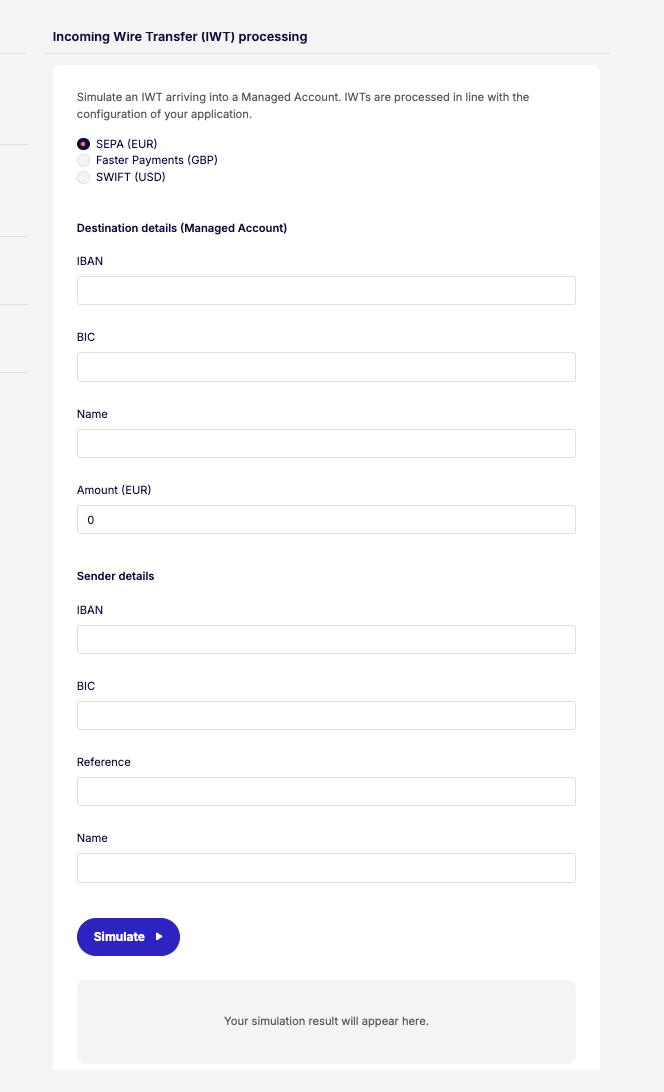
You can find the IBANIBAN (International Bank Account Number). International Bank Account Number - a standardized international bank account identifier. Managed accounts can be assigned an IBAN to enable wire transfers to and from bank accounts outside of Weavr. IBANs are required for EUR accounts and enable SEPA transfers. or sort code and account number and the payment reference (for USD IWTsIWT (Incoming Wire Transfer). Incoming Wire Transfer - a transaction that occurs when funds from a bank account held at a third-party financial institution are moved to a Weavr managed account. IWTs are initiated externally by the owner of the source bank account, and the managed account must have an assigned IBAN to receive funds.) of a managed accountManaged AccountAn account held at a financial institution that can be created and managed through the Weavr platform. Each account has a balance where customers can hold funds. Optionally, an IBAN can be assigned to enable wire transfers to bank accounts outside of Weavr. in the Console, on the customer's Managed accountsManaged AccountAn account held at a financial institution that can be created and managed through the Weavr platform. Each account has a balance where customers can hold funds. Optionally, an IBAN can be assigned to enable wire transfers to bank accounts outside of Weavr. tab.
Not all managed accountsManaged AccountAn account held at a financial institution that can be created and managed through the Weavr platform. Each account has a balance where customers can hold funds. Optionally, an IBAN can be assigned to enable wire transfers to bank accounts outside of Weavr. have a payment reference assigned to them. You only need to specify the payment reference for IWTsIWT (Incoming Wire Transfer). Incoming Wire Transfer - a transaction that occurs when funds from a bank account held at a third-party financial institution are moved to a Weavr managed account. IWTs are initiated externally by the owner of the source bank account, and the managed account must have an assigned IBAN to receive funds. to USD Managed AccountsManaged AccountAn account held at a financial institution that can be created and managed through the Weavr platform. Each account has a balance where customers can hold funds. Optionally, an IBAN can be assigned to enable wire transfers to bank accounts outside of Weavr..
Card purchase
After we issue a card, you can expect its cardholder to use it to make a purchase.
When we are notified of a new card payment on a card, we automatically update the card’s balance and statement and send a card purchase webhook to your app.
Using the simulator API
# Replace $WEAVR_API_KEY with your API key, found under API clients in the Weavr Portal account menu.
# Replace $CARD_ID with the value of the `id` field in the response object returned by managedCardGet.
# Replace $MERCHANT with the name that should be displayed as the merchant name for the simulated purchase.
# Replace $CURRENCY with the ISO-4217 code of the purchase currency that you would like to simulate.
# Replace $PURCHASE_AMOUNT with the purchase amount that you would like to simulate. The amount should be scaled to the lowest denomination of the currency.
curl --location --request POST 'https://sandbox.weavr.io/simulate/api/cards/{{$CARD_ID}}/purchase' \
--header 'Content-Type: application/json' \
--header 'programme-key: {{$WEAVR_API_KEY}}' \
--data-raw '{
  "merchantName": "{{$MERCHANT}}",
  "transactionAmount": {
    "currency": "{{$CURRENCY}}",
    "amount": {{$PURCHASE_AMOUNT}}
  }
}'
Using the simulator UI
- Open Simulator > Purchase by card ID in the Weavr Sandbox Portal.
- Input the details in the form and click on Simulate.
By selecting Additional Information you will be able to include the following parameters to your simulation:
| Field | Description |
|---|---|
| Merchant ID | Merchant’s unique identification number provided by the payment processor. |
| Merchant Category Code | 4 digit number used to classify merchant’s business by services provided. |
| Forex Fee | Fee taken from the card for a purchase that involves foreign exchange (e.g. a cardholder uses an EUR card to make a purchase at a merchant who accepts USD) |
| Forex Padding | Additional padding to the forex amount |
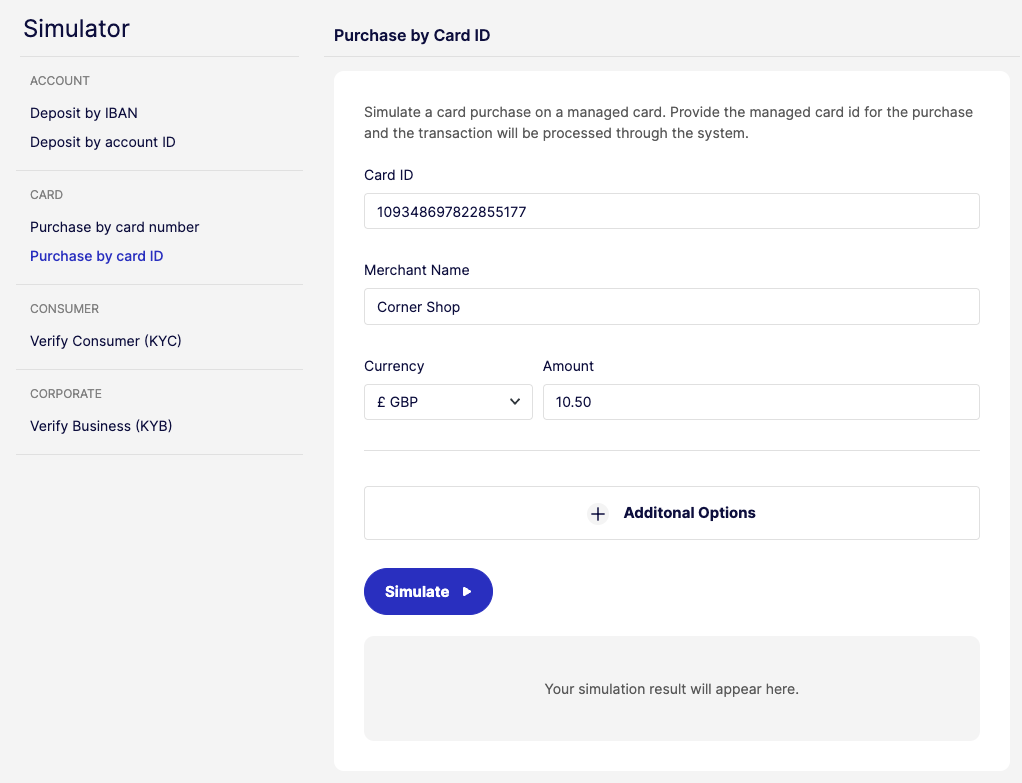
You can find the card ID of a card in the Console, on the customer's Managed cardsManaged CardA payment card (virtual or physical) that can be created and managed through the Weavr platform. Cards can operate in prepaid mode (with their own balance) or debit mode (linked to a managed account). All cards must be assigned to a card assignee who is an Authorised User. tab.
Card expiry
We send card webhooks to inform you of events related to card expiry. For more information, see card renewals.
You can simulate a card expiry scenario as follows:
Using the simulator API
# Replace $WEAVR_API_KEY with your API key, found under API clients in the Weavr Portal account menu.
# Replace $CARD_ID with the value of the `id` field in the response object returned by managedCardGet.
curl --location --request POST 'https://sandbox.weavr.io/simulate/api/cards/{{$CARD_ID}}/expire' \
--header 'Content-Type: application/json' \
--header 'programme-key: {{$WEAVR_API_KEY}}' \
--data-raw '{}'
Using the simulator UI
- Open Simulator > Card expired in the Weavr Sandbox Portal.
- Input the details in the form and click on Simulate.
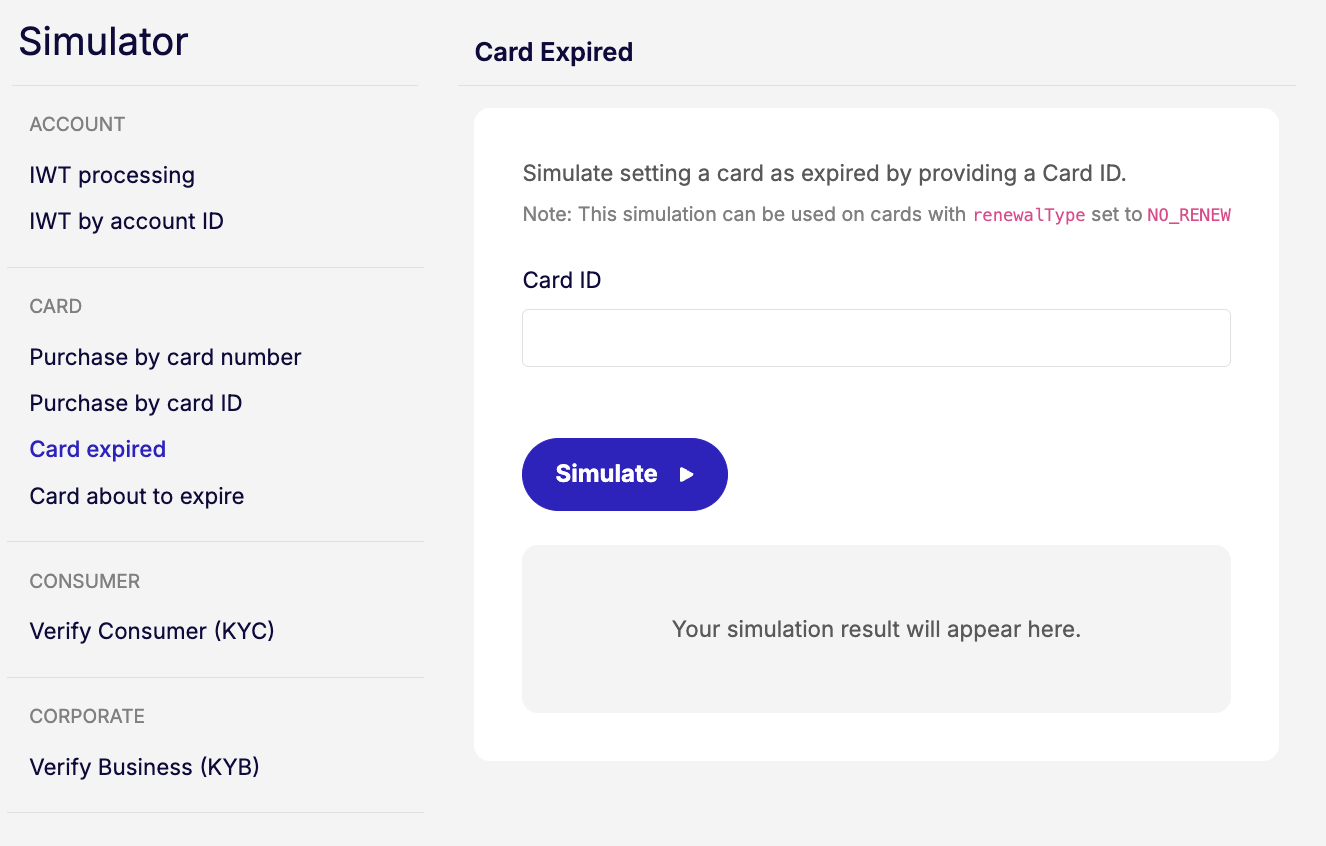
You can find the card ID for a particular card in the Console, on the customer's Managed cardsManaged CardA payment card (virtual or physical) that can be created and managed through the Weavr platform. Cards can operate in prepaid mode (with their own balance) or debit mode (linked to a managed account). All cards must be assigned to a card assignee who is an Authorised User. tab.
Card about to expire
We send card webhooks to keep you informed about upcoming card renewals, helping you take the necessary actions in time. For more information, see the card renewal process.
You can simulate a scenario of a card about to expire as follows:
Using the simulator API
# Replace $WEAVR_API_KEY with your API key, found under API clients in the Weavr Portal account menu.
# Replace $CARD_ID with the value of the `id` field in the response object returned by managedCardGet.
curl --location --request POST 'https://sandbox.weavr.io/simulate/api/cards/{{$CARD_ID}}/about_to_expire' \
--header 'Content-Type: application/json' \
--header 'programme-key: {{$WEAVR_API_KEY}}' \
--data-raw '{}'
Using the simulator UI
- Open Simulator > Card about to expire in the Weavr Sandbox Portal.
- Input the details in the form and click on Simulate.
