Webhooks
You can configure webhook endpoints via the Weavr Portal, so that you are notified about events that apply to your customers, such as card purchases, completions of due diligence processes, transaction state changes, or receipts of deposits.
To use webhooks, you need to implement an endpoint that listens to events from Weavr. We always send webhooks using a POST request with the event details included in the request body.
Every published webhook is documented in the Weavr API reference, alongside the operations for the resource it relates to. For example, corporate events sit under Corporates and card events under Managed cards.
Configure your app webhook URL
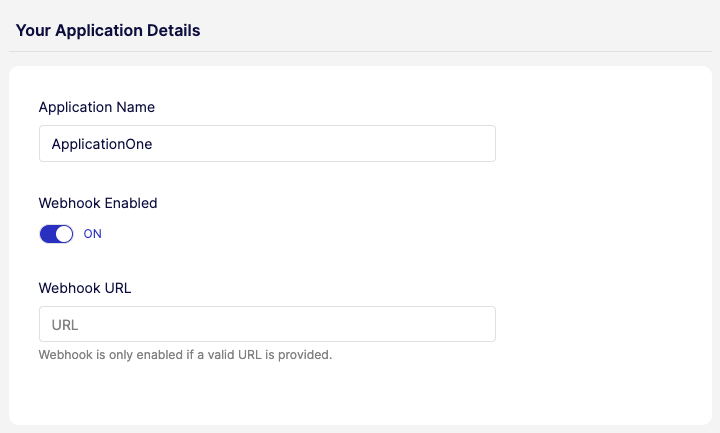
To start receiving webhooks, you need to turn on webhooks and configure the endpoint to which we send the event details through POST. You can do this in the Weavr Portal under Developers > Webhooks.
Verify the authenticity of a webhook
When we send a webhook to your configured endpoint, each request includes cryptographic signatures that allow you to verify the request originated from Weavr (has not been tampered with).
HTTP headers
Every webhook request includes the following headers:
| Header | Type | Description |
|---|---|---|
call-ref | String | Unique identifier for this webhook delivery. Use for correlation and idempotencyIdempotencyA property of an API that guarantees calling it multiple times with the same inputs produces the same result, with no additional side effects beyond the first call. An idempotent endpoint can therefore be safely retried after network errors or timeouts without risking duplicate transactions or state changes.. |
Published-Timestamp | String | Unix epoch timestamp in milliseconds when the webhook was published. |
Signature (deprecated) | String | Base64-encoded HMAC-SHA256 signature (legacy). |
Signature-v2 | String | Base64-encoded HMAC-SHA256 signature (recommended). |
Signature algorithms
Signature v2 (recommended)
Use Signature-v2 for all new integrations.
The Signature-v2 header contains a Base64-encoded HMAC-SHA256 hash computed over the concatenation of:
call-ref + request_body + published-timestamp
- No separators between the three components
request_bodyis the raw JSON payload exactly as received (do not parse and re-serialize)- Your signing key is used as the secret - see Which signing key to use
Which signing key to use
Which key signs your webhooks depends on when your programmeProgrammeA programme represents your application within Weavr. Everything you create - customers, instruments, and transactions - sits beneath a programme. When you register as an Embedder, you receive a programme in the Sandbox and, once approved, one in Live. A programme is not a Workspace: a workspace is your company's account, and it can hold several programmes. was created. To check which applies to you, open Developers > API credentials in the Portal: if the screen shows a Webhooks key, use that; if it doesn't, your webhooks are signed with an API client key.
Webhooks are signed with a dedicated Webhooks key, labelled Webhooks key ("Key used for signing of webhooks") on the Developers > API credentials screen. Select Show Webhooks key to reveal it.
This key is independent of your API keys and API clients, so adding, rotating, or deleting API clients doesn't change it. The same screen also lists an Authforwarding Webhooks key, which signs only authorization forwarding webhook events - verify those events against that key instead.
Webhooks are signed with one of your API client keys: the key from the API client with the oldest creation timestamp. The webhook headers don't identify which key was used, so during key rotation verify against your oldest API client first.
This behaviour is unchanged. If your Keys screen doesn't show a Webhooks key, your programmeProgrammeA programme represents your application within Weavr. Everything you create - customers, instruments, and transactions - sits beneath a programme. When you register as an Embedder, you receive a programme in the Sandbox and, once approved, one in Live. A programme is not a Workspace: a workspace is your company's account, and it can hold several programmes. signs this way and you don't need to do anything.
Verifying Signature-v2 headers
- Extract
call-ref,Published-Timestamp, andSignature-v2from request headers - Capture the raw request body before any parsing
- Concatenate:
{call-ref}{raw_body}{Published-Timestamp} - Compute HMAC-SHA256 using your signing key as the secret
- Base64-encode the result
- Compare with
Signature-v2using constant-time comparison
Code examples
- Shell
- Java
- Python
- Node.js
- C#
echo -n "${CALL_REF}${PAYLOAD}${PUBLISHED_TIMESTAMP}" | \
  openssl dgst -sha256 -hmac "${SIGNING_KEY}" -binary | base64
import javax.crypto.Mac;
import javax.crypto.spec.SecretKeySpec;
import java.nio.charset.StandardCharsets;
import java.security.MessageDigest;
import java.util.Base64;

public boolean verifyWebhookSignature(
        String callRef,
        String rawBody,
        String publishedTimestamp,
        String signatureV2,
        String signingKey) {
    try {
        String message = callRef + rawBody + publishedTimestamp;
        Mac mac = Mac.getInstance("HmacSHA256");
        mac.init(new SecretKeySpec(
            signingKey.getBytes(StandardCharsets.UTF_8), "HmacSHA256"));
        byte[] hash = mac.doFinal(message.getBytes(StandardCharsets.UTF_8));
        String computed = Base64.getEncoder().encodeToString(hash);

        return MessageDigest.isEqual(
            computed.getBytes(StandardCharsets.UTF_8),
            signatureV2.getBytes(StandardCharsets.UTF_8));
    } catch (Exception e) {
        return false;
    }
}
import hmac
import hashlib
import base64

def verify_webhook_signature(
    call_ref: str,
    raw_body: str,
    published_timestamp: str,
    signature_v2: str,
    signing_key: str
) -> bool:
    message = f"{call_ref}{raw_body}{published_timestamp}"
    computed = base64.b64encode(
        hmac.new(
            signing_key.encode("utf-8"),
            message.encode("utf-8"),
            hashlib.sha256
        ).digest()
    ).decode("utf-8")

    return hmac.compare_digest(computed, signature_v2)
const crypto = require("crypto");

function verifyWebhookSignature(
  callRef,
  rawBody,
  publishedTimestamp,
  signatureV2,
  signingKey
) {
  const message = `${callRef}${rawBody}${publishedTimestamp}`;
  const computed = crypto
    .createHmac("sha256", signingKey)
    .update(message, "utf8")
    .digest("base64");

  return crypto.timingSafeEqual(
    Buffer.from(computed, "utf8"),
    Buffer.from(signatureV2, "utf8")
  );
}
using System;
using System.Security.Cryptography;
using System.Text;

public static bool VerifyWebhookSignature(
    string callRef,
    string rawBody,
    string publishedTimestamp,
    string signatureV2,
    string signingKey)
{
    var message = $"{callRef}{rawBody}{publishedTimestamp}";
    using var hmac = new HMACSHA256(Encoding.UTF8.GetBytes(signingKey));
    var hash = hmac.ComputeHash(Encoding.UTF8.GetBytes(message));
    var computed = Convert.ToBase64String(hash);

    return CryptographicOperations.FixedTimeEquals(
        Encoding.UTF8.GetBytes(computed),
        Encoding.UTF8.GetBytes(signatureV2));
}
Rotating your signing key
How you rotate depends on which key signs your webhooks.
Webhooks key (programmesProgrammeA programme represents your application within Weavr. Everything you create - customers, instruments, and transactions - sits beneath a programme. When you register as an Embedder, you receive a programme in the Sandbox and, once approved, one in Live. A programme is not a Workspace: a workspace is your company's account, and it can hold several programmes. created on or after March 10, 2026). Regenerate the Webhooks key in the Portal under Developers > API credentials, then update your endpoint to verify Signature-v2 against the new value. Because the key is independent of your API clients, rotating it doesn't involve creating or deleting API clients, and rotating your API keys doesn't change your webhook signatures.
API client key (programmesProgrammeA programme represents your application within Weavr. Everything you create - customers, instruments, and transactions - sits beneath a programme. When you register as an Embedder, you receive a programme in the Sandbox and, once approved, one in Live. A programme is not a Workspace: a workspace is your company's account, and it can hold several programmes. created before March 10, 2026). If your webhooks are signed with an API client key and you rotate it:
- Create the new API client.
- Additionally accept the new
Signature-v2(webhooks continue using your oldest API client). - Delete the old API client when ready to switch.
- Webhooks immediately begin using the new oldest API client.
- Stop accepting the old
Signature-v2.
Webhooks already in flight when you rotate may still carry a signature computed with the previous key. Keep accepting both the old and new signatures until in-flight deliveries drain, then drop the old one.
Security recommendations
- Verify signatures before processing payloads
- Use constant-time comparison to prevent timing attacks
- Reject webhooks with timestamps older than 5 minutes to prevent replay attacks
- Store your signing key securely; never expose it in client-side code or logs
Webhook log
The webhook log displays the following information:
Event IDis a unique identifier linked to each webhook event, allowing for tracking and searching of specific events within the Webhook Logs page by searching by the event ID.Createddate is the timestamp when the webhook was initially created.Last Sentdate is the timestamp when the webhook was last triggered or replayed.Event Typeis a categorization of the type of event that triggered the webhook, such as a login, step-up, a type of transaction or an instrumentInstrumentA financial product owned by a customer. There are two types: Managed Accounts (stored-value accounts that hold balances and can receive wire transfers) and Managed Cards (prepaid cards - virtual or physical - used for purchases). operation.Operationdescribes the action associated with the webhook event.- The
HTTP Codereturned by the webhook event in response to the payload delivery attempt, indicating the success or failure of the operation (example 200 for success, 404 for not found, 500 for internal server error). Attemptsis the number of times the webhook event was replayed.Statusof the webhook if it was successful or not.
We restructured the list of webhook events to be presented in descending order, with the latest created event displayed first.
Webhook retries
We send webhooks as POST HTTP requests on the webhook URL that is specified in the Portal under Developers > Webhooks.
Whenever an HTTP response error (408, 409, 425, 5xx) is received in response to a webhook request, we attempt to resend the webhook according to our webhook retry policy. If retries also result in a failure, the webhook is marked as Failed and no further attempts to send the webhook are made.
Webhook retry policy
If the initial delivery fails, we retry up to 5 times (6 attempts in total) with exponential backoff. The initial delay is 10 seconds, and each subsequent delay is 6× the previous one:
- Retry 1: 10 s after the initial failed attempt
- Retry 2: 60 s after retry 1 (10 s × 6), i.e. 1 minute
- Retry 3: 360 s after retry 2 (60 s × 6), i.e. 5 minutes
- Retry 4: 2160 s after retry 3 (360 s × 6), i.e. 36 minutes
- Retry 5: 12960 s after retry 4 (2160 s × 6), i.e. 3 hours 36 minutes
If retry 5 also fails, the webhook is marked as failed and no further attempts are made.
Webhook logs can be accessed via the Portal. You can also retry the particular webhook yourself via the Portal.
Notify your customers in real time

Webhooks are the trigger you use to push real-time updates to your end customers - by email, push, SMS, or in-app message. The events your customers care about most are typically those that affect their money or their access to it:
- Card transactions: purchases, declines, refunds, and ATM withdrawals - useful for spend alerts and fraud detection.
- Card status changes: card frozen, blocked, or replaced.
- Incoming funds: deposits, incoming wire transfersWire TransferA transaction that moves funds between accounts. An incoming wire transfer moves funds from a third-party bank account to a Weavr managed account, while an outgoing wire transfer moves funds from a Weavr managed account to a third-party bank account. Wire transfers require the managed account to have an assigned IBAN (for EUR) or sort code and account number (for GBP)., and sends received.
- Outgoing transfers: outgoing wire transfersWire TransferA transaction that moves funds between accounts. An incoming wire transfer moves funds from a third-party bank account to a Weavr managed account, while an outgoing wire transfer moves funds from a Weavr managed account to a third-party bank account. Wire transfers require the managed account to have an assigned IBAN (for EUR) or sort code and account number (for GBP). and sends, including state changes such as approval, completion, or rejection.
- Identity verification: changes to KYCKYC (Know Your Customer). Know Your Customer - the identity verification process for consumer customers. This process allows you to securely verify your user's identity. Weavr asks users to submit the information and documentation they need for approval by financial providers. or KYBKYB (Know Your Business). Know Your Business - the identity verification process for corporate customers. This process allows you to securely verify your business customer's identity. Weavr asks users to submit the information and documentation they need for approval by financial providers. status, including approvals, rejections, and requests for additional information.
- Authentication events: step-up challengesStep-up challengeA two-factor authentication challenge required to step-up a user's authentication token for Strong Customer Authentication (SCA) compliance. Users must complete a second authentication factor (such as OTP via SMS, push notification, or biometrics) to access sensitive information or initiate certain transactions as required by PSD2 regulations. and login activity from new devices, useful for security alerts.
Map each event to the channel that fits its urgency. A card decline or fraud check usually warrants a push notification; a periodic balance summary fits better as an email digest.
Use webhooks to react to change - notify a customer, kick off a workflow, refresh a live screen. Don't use them to keep a copy of our data in sync in your own store; when you need the current state of something, read it from our API. See Weavr as your source of truth.