Shared fees configuration
Shared fees apply only to the SendSendA transaction type that allows sending funds to another customer's instrument or to a beneficiary. Send transactions may require Strong Customer Authentication depending on the destination and whether it's a trusted beneficiary. profileProfileA template defining the configuration for one type of object - corporate identity, consumer identity, managed account, managed card, transfer, or outgoing wire transfer. When you create one of these objects you reference its Profile ID, which tells Weavr which limits, currencies, supported countries, branding, and fees to apply. Your programme ships with one or more Profile IDs per supported object type.. Custom fees for TransfersTransferA transaction that moves funds between instruments managed by Weavr. The source and destination instruments of a transfer transaction must be owned by the same customer. Transfers can be scheduled for future execution and can be performed in bulk operations. and Outgoing Wire Transfers (OWT) are only charged to the source instrumentInstrumentA financial product owned by a customer. There are two types: Managed Accounts (stored-value accounts that hold balances and can receive wire transfers) and Managed Cards (prepaid cards - virtual or physical - used for purchases)..
To configure a shared fee in the Send profileProfileA template defining the configuration for one type of object - corporate identity, consumer identity, managed account, managed card, transfer, or outgoing wire transfer. When you create one of these objects you reference its Profile ID, which tells Weavr which limits, currencies, supported countries, branding, and fees to apply. Your programme ships with one or more Profile IDs per supported object type., follow these steps:
- Identify the Fee Group for which the shared fee is configured.
- Select the Fee Type you want to apply. If 'None' is selected as the fee type, a shared fee cannot be configured.
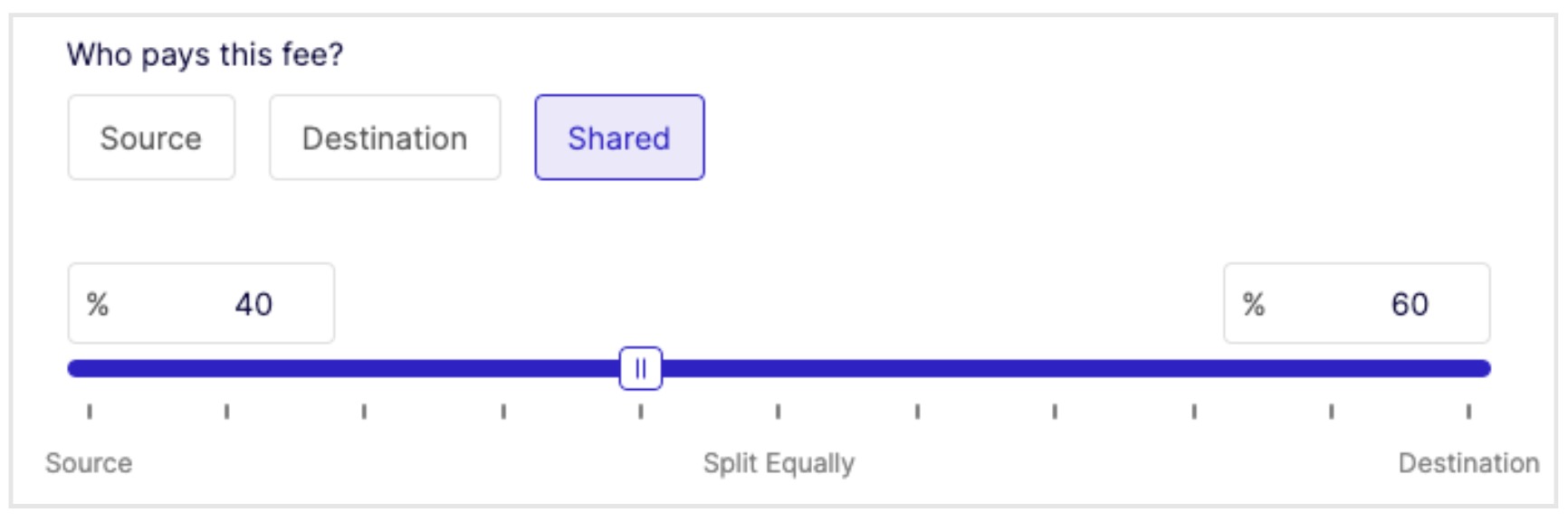
- Choose the Shared option for 'Who pays this fee'.
- Adjust the line scale pointer to set the fee percentage split between the source and destination instrumentsInstrumentA financial product owned by a customer. There are two types: Managed Accounts (stored-value accounts that hold balances and can receive wire transfers) and Managed Cards (prepaid cards - virtual or physical - used for purchases).. The combined percentage must always equal 100%. For example, if 40% is charged to the source instrumentInstrumentA financial product owned by a customer. There are two types: Managed Accounts (stored-value accounts that hold balances and can receive wire transfers) and Managed Cards (prepaid cards - virtual or physical - used for purchases)., 60% is charged to the destination instrumentInstrumentA financial product owned by a customer. There are two types: Managed Accounts (stored-value accounts that hold balances and can receive wire transfers) and Managed Cards (prepaid cards - virtual or physical - used for purchases)..
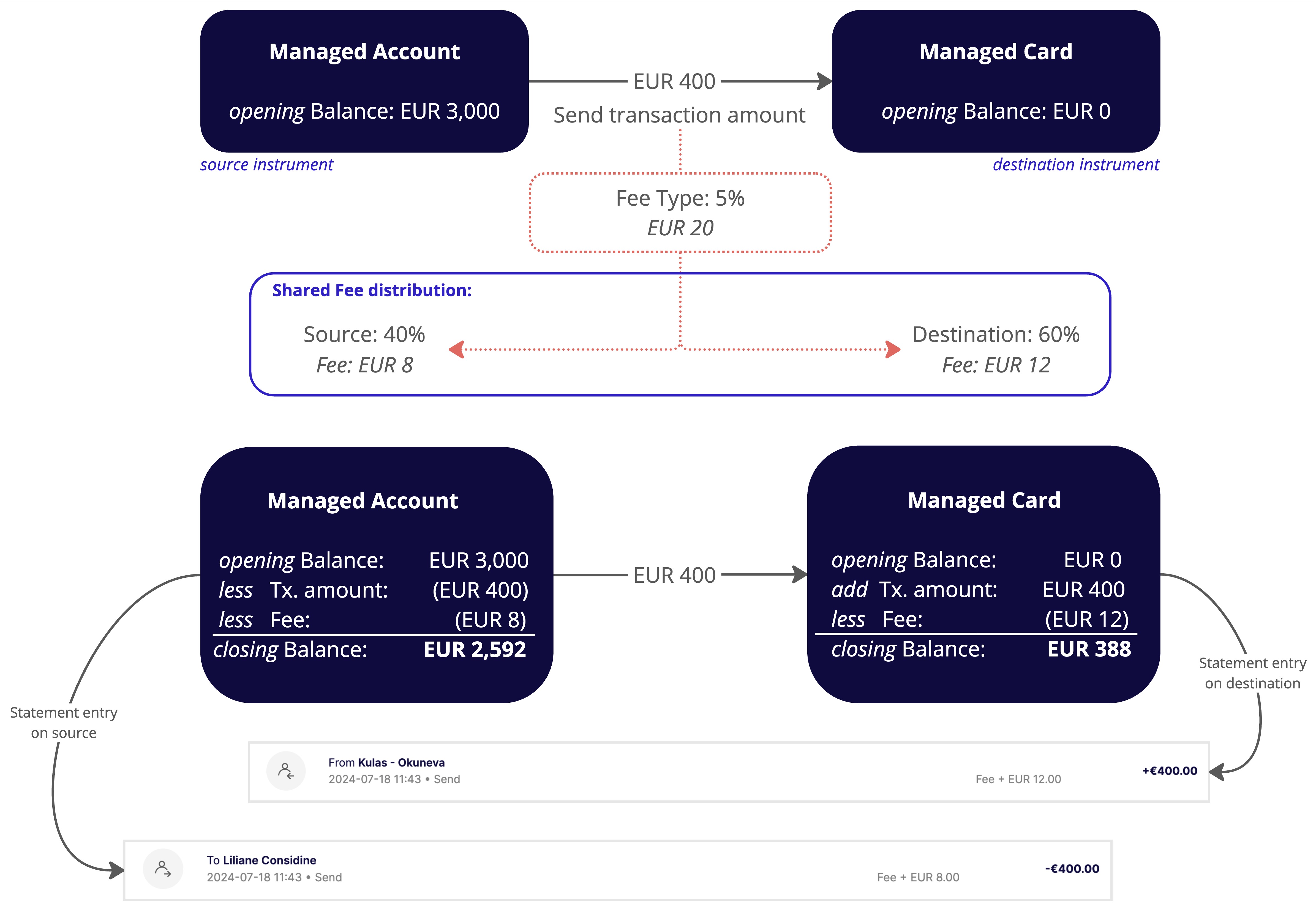
In a shared fee configuration, the fee for the destination instrumentInstrumentA financial product owned by a customer. There are two types: Managed Accounts (stored-value accounts that hold balances and can receive wire transfers) and Managed Cards (prepaid cards - virtual or physical - used for purchases). is deducted from the transaction amount. The following example illustrates how the fee is reflected in both instrumentsInstrumentA financial product owned by a customer. There are two types: Managed Accounts (stored-value accounts that hold balances and can receive wire transfers) and Managed Cards (prepaid cards - virtual or physical - used for purchases).' statements.
Shared fee example
The following example illustrates a Send profileProfileA template defining the configuration for one type of object - corporate identity, consumer identity, managed account, managed card, transfer, or outgoing wire transfer. When you create one of these objects you reference its Profile ID, which tells Weavr which limits, currencies, supported countries, branding, and fees to apply. Your programme ships with one or more Profile IDs per supported object type. fee configuration with the following parameters:
- Fee Group: Send Account To Card Fee
- Fee Type: Percentage 5%
- Shared: 40% on Source and 60% on Destination
The following diagram illustrates the changes in balance and the calculation of the shared fee between the source and destination instrumentsInstrumentA financial product owned by a customer. There are two types: Managed Accounts (stored-value accounts that hold balances and can receive wire transfers) and Managed Cards (prepaid cards - virtual or physical - used for purchases).. The top section of the diagram shows the opening balance of both instrumentsInstrumentA financial product owned by a customer. There are two types: Managed Accounts (stored-value accounts that hold balances and can receive wire transfers) and Managed Cards (prepaid cards - virtual or physical - used for purchases). and the transaction amount being sent (EUR 400). With a fee type of 5%, the total shared fee is EUR 20. The bottom section of the diagram explains the fee calculation and how the statement entries are displayed.