Cards (iOS SDK)
Prerequisites
Before implementing card components, ensure you have:
- Initialized our SDK
- Valid API credentials
- A stepped-up Access Token. All card components require step-up under PSD2 strong customer authentication. Set the token via
UXComponents.setUserToken(...)before mounting any card component.
Every secure card component in this guide is PCI DSS compliant. Sensitive values are tokenizedTokenizeReplace a card's primary account number (PAN) with a unique digital token that stands in for the real card during a transaction. When a cardholder adds a card to Apple Pay or Google Pay via push provisioning, the wallet provider stores a device-specific token rather than the underlying PAN, so the real card number isn't exposed on the device or shared with merchants. end-to-end, are never exposed to your app, and are never held in memory once rendered.
Where each component fits in your app
The four secure components in our iOS SDK each render one piece of sensitive card data inside a tokenizedTokenizeReplace a card's primary account number (PAN) with a unique digital token that stands in for the real card during a transaction. When a cardholder adds a card to Apple Pay or Google Pay via push provisioning, the wallet provider stores a device-specific token rather than the underlying PAN, so the real card number isn't exposed on the device or shared with merchants. view. The card mockup below shows where they typically appear in your app - hover the numbered hotspots for the underlying class names.
Hover or focus a numbered hotspot to see which secure component is responsible for the area - click to jump to its docs.
Mask card details with a reveal toggle
A common UX pattern is masking the CVVCVV (Card Verification Value). Card Verification Value - the 3-digit security code printed on a payment card, used to authenticate card-not-present transactions. Weavr returns CVV in tokenized form on `GET /managed_cards/{id}` (with a stepped-up token); the value is only detokenized inside the SDK's secure CVV display component. or PINPIN (Personal Identification Number). Personal Identification Number - the numeric code a cardholder enters to authorize chip-and-PIN purchases and ATM withdrawals. PIN is only present on physical managed cards. Weavr returns it tokenized on `GET /managed_cards/{id}` (with a stepped-up token), and the SDK detokenizes it inside a secure PIN display component. - hiding it behind a reveal toggle so the value only appears when the cardholder asks for it. Our SDK handles the secure rendering, but the mask/reveal UI is your responsibility - the SDK never returns the raw value to your app, so you can't show and hide it yourself.
Wire it up like this:
- Hidden state: render your own placeholder (for example, a row of dots) with a reveal button next to it. Don't mount the secure component yet - no detokenization happens until you ask for it.
- On tap: mount the secure component and trigger detokenization. The SDK renders the real value inside its sandboxed view; your app never sees it.
- Hide again: unmount or remove the secure component and restore your placeholder.
Use the same approach for any display component - card number, CVVCVV (Card Verification Value). Card Verification Value - the 3-digit security code printed on a payment card, used to authenticate card-not-present transactions. Weavr returns CVV in tokenized form on `GET /managed_cards/{id}` (with a stepped-up token); the value is only detokenized inside the SDK's secure CVV display component., or card PINPIN (Personal Identification Number). Personal Identification Number - the numeric code a cardholder enters to authorize chip-and-PIN purchases and ATM withdrawals. PIN is only present on physical managed cards. Weavr returns it tokenized on `GET /managed_cards/{id}` (with a stepped-up token), and the SDK detokenizes it inside a secure PIN display component. view.
Stepped-up auth tokens are short-lived. Deferring detokenization until the user taps reveal also keeps that window narrow.
Let the cardholder copy revealed details
SecureCardNumberLabel, SecureCVVLabel, and SecureCardPinLabel can copy their displayed value when the cardholder taps or long-presses the label. Copying is disabled by default. Enable either gesture after creating the label:
secureLabel.enableCopyTextToClipboardOnClick(enabled: true) { _ in
    // Show a "Card number copied" confirmation.
}

secureLabel.enableCopyTextToClipboardOnLongClick(enabled: true) { _ in
    // Show a "Card number copied" confirmation.
}
The same methods are available on SecureCVVLabel and SecureCardPinLabel. Pass nil for the completion handler if you don't need a callback.
The SDK writes the displayed value to the system pasteboard as plain text. A card number keeps its displayed spaces or line breaks. The labels don't support normal text selection, so your app must enable one of these gestures to let the cardholder copy the value.
The pasteboard is outside the SDK's secure view and may be readable by the operating system or other apps. Only enable copying after the cardholder has completed step-up, explain what was copied, and hide the revealed value promptly.
Copied values automatically expire from the device clipboard after 2 minutes, and never sync to other Apple devices through Universal Clipboard.
Card number - SecureCardNumberLabel
Use it for: card details and virtual-card screens where the cardholder needs to read or copy their full PANPAN (Primary Account Number). Primary Account Number - the long card number (typically 16 digits) printed or embossed on a payment card and used to identify the card on the payment network. Weavr never returns the raw PAN to your client; `GET /managed_cards/{id}` returns the PAN in tokenized form as `cardNumber`, and the value is only detokenized inside a Secure UI card-number component (a sandboxed iframe on the web, a secure native view on mobile)., typically behind a reveal toggle.
The card number component shows the full 16-digit card number to your customers.
You need to include the components in your app either in code or using a Storyboard.
- In code
- Storyboard
lazy var secureLabel: SecureCardNumberLabel = {
        let label = SecureCardNumberLabel()
        label.frame = CGRect(x: 10, y: 20, width: 300, height: 60)
        label.backgroundColor = .red
        return label
    }()
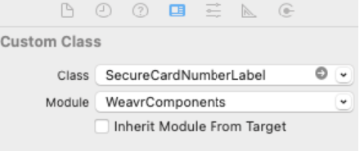
This can be achieved by dragging and dropping the UILabel component to your storyboard. In the Identity inspector, cast the type to SecureCardNumberLabel in the Class block.
Detokenization
Once you have implemented SecureCardNumberLabel, detokenise(_:) displays the underlying card number by resolving a token to its plaintext value:
let result = await self.secureLabel.detokenise("tokenizedCardNumber")
switch result {
case .success(let traceability):
    break
case .serverError(let code, let message, let traceability):
    // The server rejected the token, e.g. it's no longer valid or has expired.
    // Consider re-tokenising the underlying value and detokenising again.
case .networkFailure(let cause, let traceability):
    // The device couldn't reach the server. Retry once connectivity is restored.
case .failure(let cause, let traceability):
    // An unexpected error occurred. Retry, and share `traceability` with our
    // support team if it keeps happening.
}
Vertical card number display
You can display a card number using vertical alignment, by adding the following line of code:
self.SecureCardNumberLabel.isVertical = true
The card number would show as:
5412
1234
5678
9012
CVV - SecureCVVLabel
Use it for: card details screens where the cardholder needs the CVVCVV (Card Verification Value). Card Verification Value - the 3-digit security code printed on a payment card, used to authenticate card-not-present transactions. Weavr returns CVV in tokenized form on `GET /managed_cards/{id}` (with a stepped-up token); the value is only detokenized inside the SDK's secure CVV display component. for an online purchase, typically behind a reveal toggle.
The CVVCVV (Card Verification Value). Card Verification Value - the 3-digit security code printed on a payment card, used to authenticate card-not-present transactions. Weavr returns CVV in tokenized form on `GET /managed_cards/{id}` (with a stepped-up token); the value is only detokenized inside the SDK's secure CVV display component. component shows the 3-digit number your customers need to make online purchases.
You need to include the components in your app either in code or using a Storyboard.
- In code
- Storyboard
    lazy var cvvLabel: SecureCVVLabel = {
            let label = SecureCVVLabel()
            label.frame = CGRect(x: 10, y: 20, width: 300, height: 60)
            return label
        }()
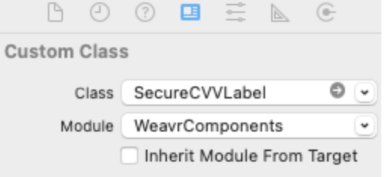
This can be achieved by dragging and dropping the UILabel component to your storyboard. In the Identity inspector, cast the type to SecureCVVLabel in the Class block.
Detokenization
Once you have implemented SecureCVVLabel, it has inbuilt detokenizing capability via detokenise(_:), the same as SecureCardNumberLabel above.
Card PIN view - SecureCardPinLabel
Use it for: physical-card management screens where the cardholder needs to recover the existing PINPIN (Personal Identification Number). Personal Identification Number - the numeric code a cardholder enters to authorize chip-and-PIN purchases and ATM withdrawals. PIN is only present on physical managed cards. Weavr returns it tokenized on `GET /managed_cards/{id}` (with a stepped-up token), and the SDK detokenizes it inside a secure PIN display component., typically behind a reveal toggle.
The card PINPIN (Personal Identification Number). Personal Identification Number - the numeric code a cardholder enters to authorize chip-and-PIN purchases and ATM withdrawals. PIN is only present on physical managed cards. Weavr returns it tokenized on `GET /managed_cards/{id}` (with a stepped-up token), and the SDK detokenizes it inside a secure PIN display component. component shows the 4-digit PINPIN (Personal Identification Number). Personal Identification Number - the numeric code a cardholder enters to authorize chip-and-PIN purchases and ATM withdrawals. PIN is only present on physical managed cards. Weavr returns it tokenized on `GET /managed_cards/{id}` (with a stepped-up token), and the SDK detokenizes it inside a secure PIN display component. your customers need for in-person purchases. Use it only if you are issuing physical cardsPhysical CardA payment card that is printed or embedded in wearables and sent to customers directly. Physical cards are created by first creating a virtual card and then upgrading it to a physical card. They are sent in an inactive state and must be activated by the card assignee before first use..
You need to include the components in your app either in code or using a Storyboard.
- In code
- Storyboard
    lazy var showCardPinLabel: SecureCardPinLabel = {
        let label = SecureCardPinLabel()
        label.frame = CGRect(x: 10, y: 20, width: 300, height: 60)
        label.backgroundColor = .red
        return label
    }()
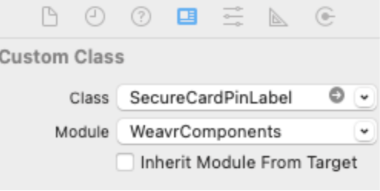
This can be achieved by dragging and dropping the UILabel component to your storyboard. In the Identity inspector, cast the type to SecureCardPinLabel in the Class block.
Detokenization
Once you have implemented SecureCardPinLabel, detokenise(_:) displays the underlying PINPIN (Personal Identification Number). Personal Identification Number - the numeric code a cardholder enters to authorize chip-and-PIN purchases and ATM withdrawals. PIN is only present on physical managed cards. Weavr returns it tokenized on `GET /managed_cards/{id}` (with a stepped-up token), and the SDK detokenizes it inside a secure PIN display component. by resolving a token to its plaintext value:
let result = await self.showCardPinLabel.detokenise("tokenizedCardNumber")
switch result {
case .success(let traceability):
    break
case .serverError(let code, let message, let traceability):
    // The server rejected the token, e.g. it's no longer valid or has expired.
    // Consider re-tokenising the underlying value and detokenising again.
case .networkFailure(let cause, let traceability):
    // The device couldn't reach the server. Retry once connectivity is restored.
case .failure(let cause, let traceability):
    // An unexpected error occurred. Retry, and share `traceability` with our
    // support team if it keeps happening.
}
Card PIN set - SecureCardPinField
Use it for: the physical-card upgrade or activation screen, when you let the cardholder choose their own PINPIN (Personal Identification Number). Personal Identification Number - the numeric code a cardholder enters to authorize chip-and-PIN purchases and ATM withdrawals. PIN is only present on physical managed cards. Weavr returns it tokenized on `GET /managed_cards/{id}` (with a stepped-up token), and the SDK detokenizes it inside a secure PIN display component..
The capture card PINPIN (Personal Identification Number). Personal Identification Number - the numeric code a cardholder enters to authorize chip-and-PIN purchases and ATM withdrawals. PIN is only present on physical managed cards. Weavr returns it tokenized on `GET /managed_cards/{id}` (with a stepped-up token), and the SDK detokenizes it inside a secure PIN display component. component collects a new 4-digit PINPIN (Personal Identification Number). Personal Identification Number - the numeric code a cardholder enters to authorize chip-and-PIN purchases and ATM withdrawals. PIN is only present on physical managed cards. Weavr returns it tokenized on `GET /managed_cards/{id}` (with a stepped-up token), and the SDK detokenizes it inside a secure PIN display component. that your customer chooses for their physical cardPhysical CardA payment card that is printed or embedded in wearables and sent to customers directly. Physical cards are created by first creating a virtual card and then upgrading it to a physical card. They are sent in an inactive state and must be activated by the card assignee before first use..
The component only accepts numeric input, masks each digit as the customer types it, and only produces a token once exactly 4 digits have been entered.
Due to strong customer authentication requirements, your authentication token must be stepped-up before calling this component.
You need to include the components in your app either in code or using a Storyboard.
- In code
- Storyboard
lazy var securedPinField: SecureCardPinField = {
    let field = SecureCardPinField()
    field.frame = CGRect(x: 10, y: 20, width: 300, height: 60)
    field.backgroundColor = .red
    return field
}()
This can be achieved by dragging and dropping the UITextField component to your storyboard. In the Identity inspector, cast the type to SecureCardPinField in the Class block.