Set up
Before starting, make sure you follow the Get started guide, where you'll find what's needed for integration.
Push provisioningPush ProvisioningA method that allows cardholders to add their card to a digital wallet (such as Apple Pay or Google Pay) directly from your app. The card details are securely tokenized and sent to the wallet provider, streamlining the process and enhancing the user experience compared to manual provisioning. This feature is currently in beta. needs configuration on our side before any SDK code can work. If you haven't already, book a call with our team at [email protected] before you continue. The overview explains what we set up and why.
Prerequisites
| Release | Release date | React Native | React | Expo |
|---|---|---|---|---|
| 4.0 | December, 2025 | ~0.79 | ~19 | ~53 |
| 3.0 | August, 2025 | ~0.79 | ~19 | ~53 |
| 2.5 | February, 2025 | ~0.76.3 | ~18.3.1 | n/a |
Installation
The first step is to install our Push ProvisioningPush ProvisioningA method that allows cardholders to add their card to a digital wallet (such as Apple Pay or Google Pay) directly from your app. The card details are securely tokenized and sent to the wallet provider, streamlining the process and enhancing the user experience compared to manual provisioning. This feature is currently in beta. SDK as a dependency of your app:
- npm
- yarn
npm install @weavr-io/push-provisioning-react-native
yarn add @weavr-io/push-provisioning-react-native
You'll need to configure the iOS and Android native projects within your app, as Push ProvisioningPush ProvisioningA method that allows cardholders to add their card to a digital wallet (such as Apple Pay or Google Pay) directly from your app. The card details are securely tokenized and sent to the wallet provider, streamlining the process and enhancing the user experience compared to manual provisioning. This feature is currently in beta. requires native capabilities.
Set up the iOS project
Configure CocoaPods
Add the following sources within your Podfile:
source 'https://gitlab.com/phyreapp/ios-specs.git'

# rest of your Podfile
# …
Then, update your targets dependencies by adding:
pod 'WeavrPushProvisioning', :git => "https://#{ENV['WEAVR_GITHUB_TOKEN']}@github.com/weavr-io/push-provisioning-ios", :tag => 'x.y.z'
Replace x.y.z with the iOS pod tag that matches your React Native SDK release:
| React Native SDK | iOS pod tag |
|---|---|
| 4.x | 2.0.0 |
The release notes for any later React Native release call out a new iOS pod tag when it changes. See the release notes.
The pod lives in a private repository, so you need the token we provided you. Set it in your environment when installing, making sure not to commit it to your repository:
WEAVR_GITHUB_TOKEN=<TOKEN> pod install
You'll have to manually update this version when updating the React Native SDK so it stays in sync with our iOS SDK.
If your app already used the Components SDK before adding push provisioningPush ProvisioningA method that allows cardholders to add their card to a digital wallet (such as Apple Pay or Google Pay) directly from your app. The card details are securely tokenized and sent to the wallet provider, streamlining the process and enhancing the user experience compared to manual provisioning. This feature is currently in beta., the main app target and the Wallet ExtensionWallet ExtensionAn iOS app extension that integrates an issuer app with Apple Wallet. The UI Wallet Extension provisions a card from the issuer app into Wallet (the in-app provisioning flow). The Non-UI Wallet Extension exposes the issuer's card-management actions (such as 'View card details') from inside Wallet itself. Apple requires both for a primary issuer-app integration. now both depend on our frameworks. If the app builds fine but crashes on launch with a dyld "Library not loaded" error for a Weavr framework, pin CocoaPods to 1.17.0+ via a Gemfile and run pod install with bundle exec. See App crashes at launch with "Library not loaded" for a Weavr framework for the full explanation and fix.
Mandatory: Adding provisioning_config file
For the correct functioning of the SDK, a configuration file is required to initialize dependencies.
Please contact the support team at [email protected] to obtain this file.
Important: The file must be named exactly provisioning_config (no extension) and placed at build time in the appropriate location for each platform:
- Android:
android/app/src/main/res/raw/provisioning_config - iOS: Anywhere in the iOS bundle (for example,
ios/MyApp/assets/) and added to the app target and any Wallet ExtensionWallet ExtensionAn iOS app extension that integrates an issuer app with Apple Wallet. The UI Wallet Extension provisions a card from the issuer app into Wallet (the in-app provisioning flow). The Non-UI Wallet Extension exposes the issuer's card-management actions (such as 'View card details') from inside Wallet itself. Apple requires both for a primary issuer-app integration. targets
The SDK fails initialization if this file is missing.
Example CI injection for Android:
echo "$WEAVR_PROVISIONING_CONFIG_B64" | base64 --decode > android/app/src/main/res/raw/provisioning_config
Ensure that the provisioning_config file is included in the final application bundle. If you use a clean-up script to remove secrets after the build, ensure it runs after the packaging process is complete.
Set up the Xcode project
- Ensure Xcode 16.4 or newer is installed.
- Verify Swift 5.9 or newer is configured.
- Add
provisioning_configto your app target and any Wallet ExtensionWallet ExtensionAn iOS app extension that integrates an issuer app with Apple Wallet. The UI Wallet Extension provisions a card from the issuer app into Wallet (the in-app provisioning flow). The Non-UI Wallet Extension exposes the issuer's card-management actions (such as 'View card details') from inside Wallet itself. Apple requires both for a primary issuer-app integration. targets that interact with Apple Pay. - For Wallet ExtensionsWallet ExtensionAn iOS app extension that integrates an issuer app with Apple Wallet. The UI Wallet Extension provisions a card from the issuer app into Wallet (the in-app provisioning flow). The Non-UI Wallet Extension exposes the issuer's card-management actions (such as 'View card details') from inside Wallet itself. Apple requires both for a primary issuer-app integration., ensure proper entitlements and capabilities are set.
Finally, run pod install in the iOS project directory:
cd ios
pod install
Set up your app for push provisioning
A requirement of iOS Push ProvisioningPush ProvisioningA method that allows cardholders to add their card to a digital wallet (such as Apple Pay or Google Pay) directly from your app. The card details are securely tokenized and sent to the wallet provider, streamlining the process and enhancing the user experience compared to manual provisioning. This feature is currently in beta. with Apple, is for your mobile app to complete the Entitlement process.
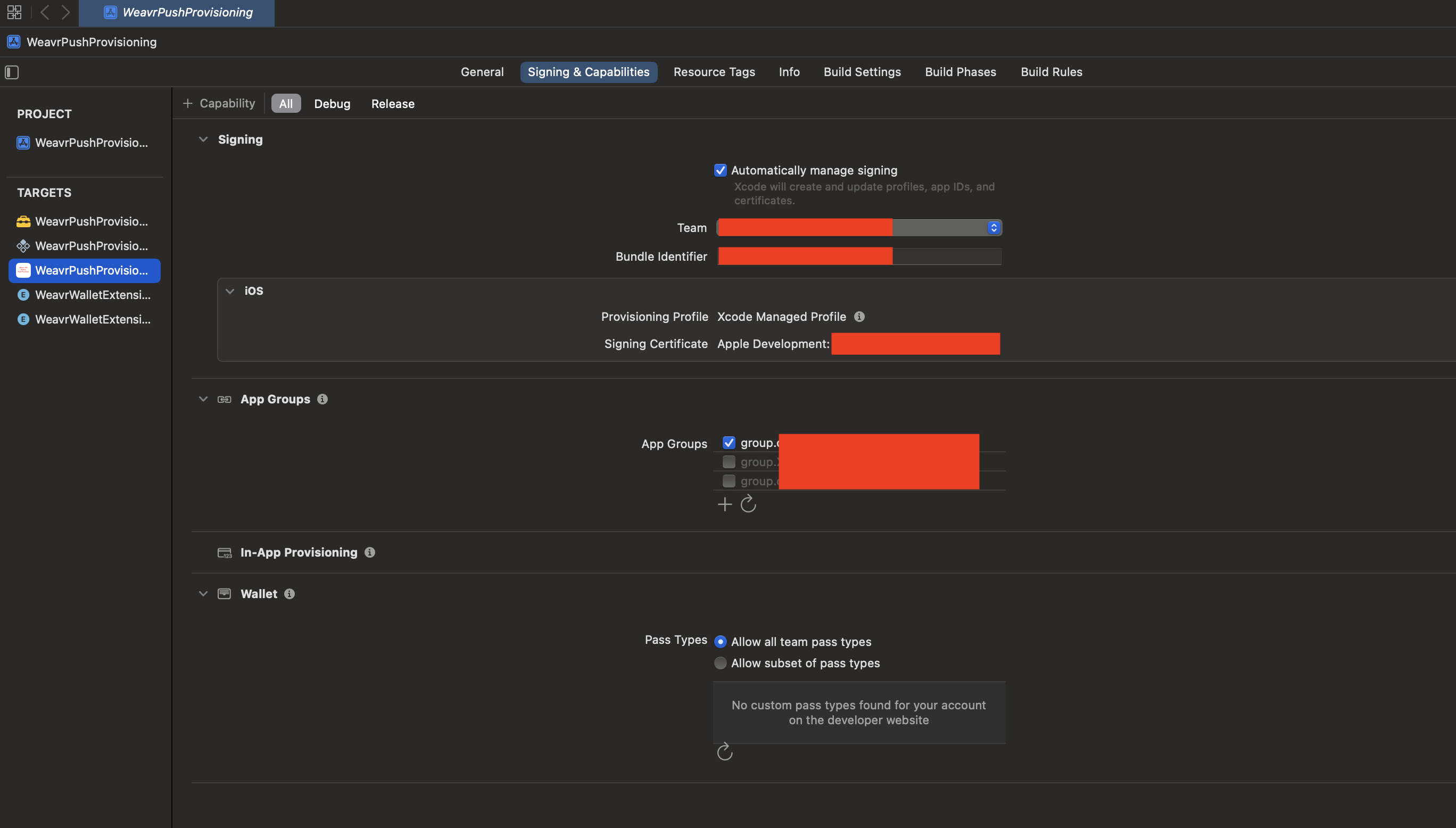
The first step is to add the requirement capabilities and Entitlements to your app.
Navigate to the project containing your app in Xcode, and select your App's target, then navigate to the tab Signing & Capabilities.
Here, ensure you have the following capabilities enabled:
- App Groups: to allow the Wallet ExtensionsWallet ExtensionAn iOS app extension that integrates an issuer app with Apple Wallet. The UI Wallet Extension provisions a card from the issuer app into Wallet (the in-app provisioning flow). The Non-UI Wallet Extension exposes the issuer's card-management actions (such as 'View card details') from inside Wallet itself. Apple requires both for a primary issuer-app integration. to access the storage of your app.
- In-App ProvisioningIn-app provisioningThe flow that adds a card to a digital wallet (Apple Pay, Google Pay) from inside an issuer's mobile app, using the issuer's own authentication. In Weavr's stack, in-app provisioning is implemented via our Push Provisioning SDK on iOS or React Native.: to allow to provision cards from within your app.
- Wallet, including Allow all team pass types: to check the status of the cards within Apple Pay, and
decide whether to display the
AddToWalletButton.
To be able to provision a card successfully, Apple requires you to:
- Distribute the app via TestFlight
- Ensure that the app ID and provisioning profilesProfileA template defining the configuration for one type of object - corporate identity, consumer identity, managed account, managed card, transfer, or outgoing wire transfer. When you create one of these objects you reference its Profile ID, which tells Weavr which limits, currencies, supported countries, branding, and fees to apply. Your programme ships with one or more Profile IDs per supported object type. you use to distribute your builds have access to all capabilities described earlier.
Once your project is configured correctly, your target should look like this:
Set up the Android project
Configure Maven repositories
The SDK is distributed via a private GitHub Packages repository. You need to configure your project to authenticate and download the SDK.
1. Obtain credentials
Get in touch with our support team at [email protected] to obtain:
- GitHub username or email
- GitHub Personal Access Token (with
read:packagespermission)
2. Create secrets.properties
Create a secrets.properties file at the root of your Android project (e.g., android/secrets.properties) to store these credentials securely.
Do not commit this file to version control. Add it to your .gitignore.
WEAVR_GITHUB_USERNAME=your-github-username
WEAVR_GITHUB_TOKEN=ghp_xxxxxxxxxxxxxxxxxxxx
3. Update settings.gradle
Update your android/settings.gradle (or settings.gradle.kts) file to include our GitHub Packages repository.
- Groovy (settings.gradle)
- Kotlin (settings.gradle.kts)
def keystorePropertiesFile = new File(settingsDir, "secrets.properties")
if (!keystorePropertiesFile.canRead()) {
    throw new GradleException(
        "secrets.properties is required. " +
        "Please contact [email protected] to obtain GitHub packages credentials."
    )
}
def keystoreProperties = new Properties()
keystoreProperties.load(new FileInputStream(keystorePropertiesFile))

dependencyResolutionManagement {
    repositoriesMode.set(RepositoriesMode.FAIL_ON_PROJECT_REPOS)
    repositories {
        google()
        mavenCentral()

        // Weavr GitHub Packages repository
        maven {
            url = uri("https://maven.pkg.github.com/weavr-io/push-provisioning-android")
            name = "Weavr-GitHub-Packages"
            credentials {
                username = keystoreProperties['WEAVR_GITHUB_USERNAME']
                password = keystoreProperties['WEAVR_GITHUB_TOKEN']
            }
        }
    }
}
val keystorePropertiesFile = File(settingsDir, "secrets.properties")
if (!keystorePropertiesFile.canRead()) {
throw GradleException(
"secrets.properties is required. " +
)
}
val keystoreProperties = java.util.Properties()
keystoreProperties.load(java.io.FileInputStream(keystorePropertiesFile))
dependencyResolutionManagement {
repositoriesMode.set(RepositoriesMode.FAIL_ON_PROJECT_REPOS)
repositories {
google()
mavenCentral()
// Weavr GitHub Packages repository
maven {
url = uri("https://maven.pkg.github.com/weavr-io/push-provisioning-android")
name = "Weavr-GitHub-Packages"
credentials {
username = keystoreProperties["WEAVR_GITHUB_USERNAME"] as String
password = keystoreProperties["WEAVR_GITHUB_TOKEN"] as String
}
}
}
}
4. Update .gitignore
Ensure you don't commit sensitive files to version control:
android/secrets.properties
android/app/src/main/res/raw/provisioning_config
Enable Java 17 and core library desugaring
The SDK requires Java 17 and core library desugaring. Enable both in your app module:
android {
    compileOptions {
        sourceCompatibility JavaVersion.VERSION_17
        targetCompatibility JavaVersion.VERSION_17
        coreLibraryDesugaringEnabled true
    }
}

dependencies {
    coreLibraryDesugaring 'com.android.tools:desugar_jdk_libs:2.1.5'
}
General security best practices
- Store secrets safely: store UI keysUI keyA public key that authorizes Weavr's Secure UI components - the inputs and displays in our Web, Android, iOS, and React Native SDKs that handle passwords, PINs, card details, and KYC/KYB flows. Unlike the API key, the UI key isn't an API credential; you don't call REST endpoints with it. It's safe to embed in client-side code, and Sandbox and Live each have their own UI key., repo credentials, and provisioning config inputs in your CI/CD secret storage.
- Rotate tokens: rotate GitHub tokens on a regular schedule.
- Do not commit configs: never commit the
provisioning_configfile to version control; use CI/CD secrets management to inject it at build time.
Expo projects
Apply the native setup on this page directly in your ios and android projects, and commit those projects. Don't use expo prebuild or Expo config plugins, including any plugin shipped in the SDK package, to configure push provisioningPush ProvisioningA method that allows cardholders to add their card to a digital wallet (such as Apple Pay or Google Pay) directly from your app. The card details are securely tokenized and sent to the wallet provider, streamlining the process and enhancing the user experience compared to manual provisioning. This feature is currently in beta..
Config plugins and prebuild rewrite files such as the Podfile, the Xcode project, entitlements, and Gradle files each time they run, and prebuild --clean regenerates the native folders from scratch. Apple Wallet ExtensionsWallet ExtensionAn iOS app extension that integrates an issuer app with Apple Wallet. The UI Wallet Extension provisions a card from the issuer app into Wallet (the in-app provisioning flow). The Non-UI Wallet Extension exposes the issuer's card-management actions (such as 'View card details') from inside Wallet itself. Apple requires both for a primary issuer-app integration. are additional native targets, each with their own Podfile entries, Info.plist, entitlements, capabilities, and provisioning_config file. Rewriting the native projects can remove or break these targets.
If you currently generate your native folders with prebuild, run it once, commit the ios and android folders, and make native changes directly in them from then on.